Can I import a spreadsheet I already keep?
Yes — ⬆ Import takes .xlsx, .xls or .csv, lets you set each column's type, and needs you to nominate one column as the date.
The whole parse happens in your browser. Nothing is sent anywhere until you press Import.
Step by step
- Press ⬆ Import in the desk header and choose your file.
- If the workbook has several sheets, pick the one you want from the Sheet dropdown. Only one sheet becomes the dataset.
- Check the dataset name — it defaults to the filename.
- Go down the column list. Untick anything you do not want. Rename anything cryptic. Set each column's type, because the type decides how the column can be used later: a number column can be measured, a text column can only be read.
- Mark exactly one column as the date column with the radio button on its right. This is required — every row in a dataset is stamped with a date, and without one there is nothing to import. Only columns typed as date can be chosen.
- Check the preview of the first five rows, then press Import.

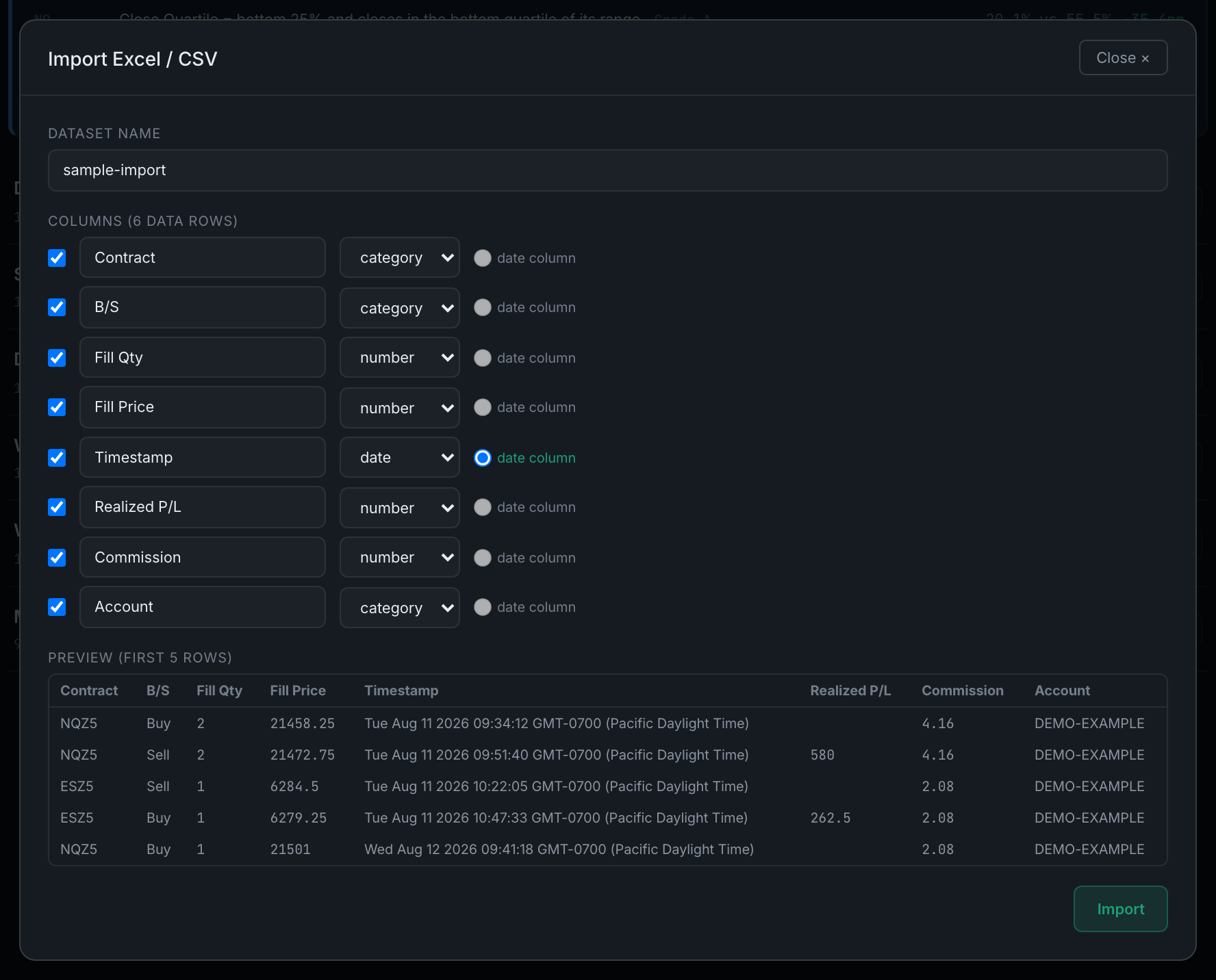
Two things the importer will tell you afterwards rather than hide: how many rows it skipped for having no valid date, and how many individual cells it could not read as the type you gave their column. If the insert fails partway, the partial dataset is kept rather than silently dropped — delete it from the desk and import again.
An imported dataset is manual for good. It has no instrument, so nothing backfills into it and the edge scan cannot sweep it. What it can do is hold studies you build by hand, and act as a target for a transfer test.