Built for serious futures & stocks traders

Know your edge.
Protect your capital.
Repeat.

Voice log in 10 seconds. AI reads your charts. 30+ analytics show exactly where you make — and lose — money. Launching soon — join the founders list and lock in your spot.

Join the Founders List See how it works ↓

14-day trial  ·  No free tier  ·  Founders price locked in for the list

TradePerformance — Analytics Overview
Founders
List
Early Access
0+
Charts & analytics
0s
To log a trade
0
Analytics tabs
0
Day trial, full app
Voice LoggingLog a trade in 10 seconds
Founders ListFounders price, locked in for the list
Tilt Score 1–10Live severity from emotion + behavior data
AI CoachKnows your last 30 trades before you ask
30+ ChartsEdge, Execution, Risk, Psychology
Prop Firm ToolsDLL tracker, pass probability, circuit breaker
Daily DebriefMental scores, prep, per-trade review
BYOKYour key, your data, zero markup
PlaybookStrategy templates built in
Pattern Alerts6 behavioral detectors in real time
News P&LSee how your trades react to events
Inline EditingEdit setup, stop, TP, CVD — right in the table
Voice LoggingLog a trade in 10 seconds
Founders ListFounders price, locked in for the list
Tilt Score 1–10Live severity from emotion + behavior data
AI CoachKnows your last 30 trades before you ask
30+ ChartsEdge, Execution, Risk, Psychology
Prop Firm ToolsDLL tracker, pass probability, circuit breaker
Daily DebriefMental scores, prep, per-trade review
BYOKYour key, your data, zero markup
PlaybookStrategy templates built in
Pattern Alerts6 behavioral detectors in real time
News P&LSee how your trades react to events
Inline EditingEdit setup, stop, TP, CVD — right in the table
The System

Good traders log trades.
Great traders run a system.

Every session runs the same loop — from pre-market plan to post-session review. Miss a step and you miss the improvement.

01

Build Your Playbook

Define every setup — entry rules, checklist, risk params. Lock in your edge before price moves.

02

Prep Before the Open

Set your bias. Map key levels. Answer your pre-market questions. Trade with a plan, not a guess.

03

Log It Fast

Voice activate mid-session. AI reads your chart screenshots and fills in context. Under 10 seconds.

04

Analyze Your Edge

30+ charts show your real performance — by setup, session, time, level, and mental state.

05

Review with AI

A coach that loads your last 30 trades, setups, and debrief before you type a word.

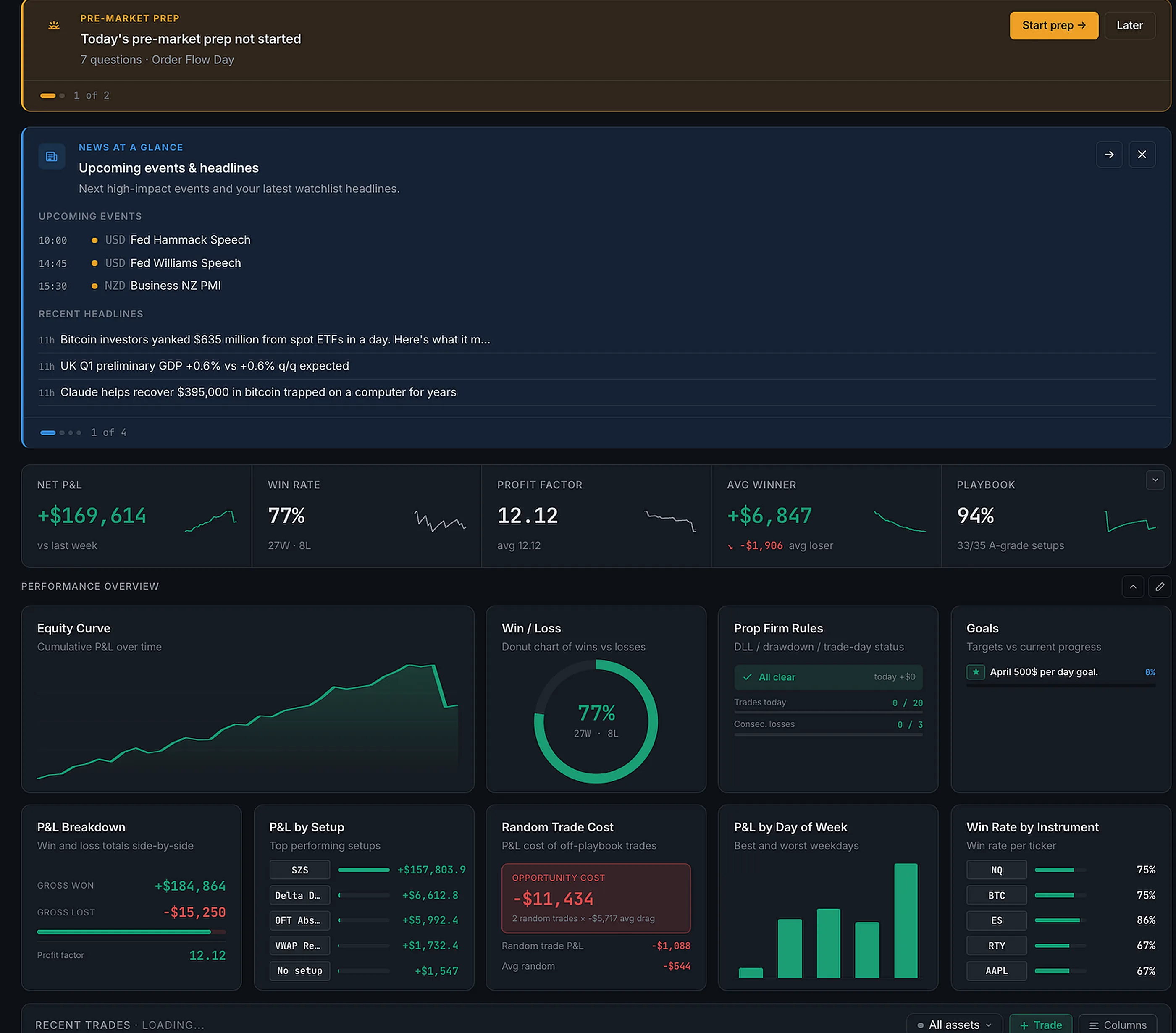
Dashboard

Your entire session
at a glance.

The dashboard is fully customizable — choose your widgets, arrange them how you want. Every widget updates live across whatever account and date range you've filtered. No digging. No spreadsheet. Just your performance, surfaced instantly.

  • Widget grid — Equity Curve, Win/Loss donut, Daily P&L, and more. Toggle 1 or 2 rows, drag to reorder
  • Stats row: Net P&L, Win Rate, Profit Factor, Avg Winner, Playbook % — live across your selected filters
  • Pattern Alerts — 6 real-time behavioral detectors fire the moment your trading goes off-plan
  • Weekly Edge Report — Monday morning summary of your prior week's performance patterns
  • Daily Coach card and live Tilt banner — AI session notes and real-time tilt severity
Customizable Widgets Pattern Alerts Weekly Report Tilt Monitor
TradePerformance Dashboard
Trade Journal

The fastest log.
The deepest record.

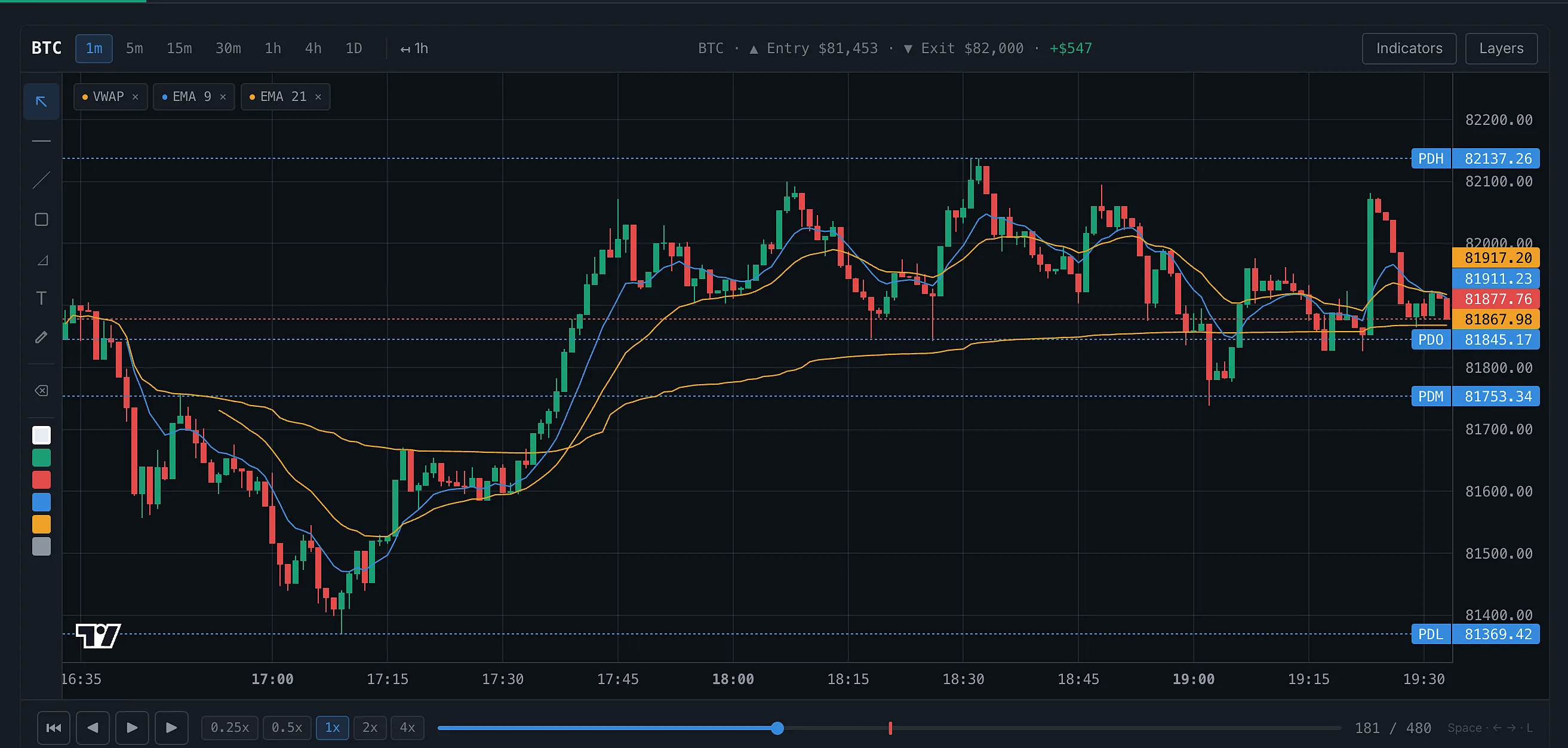
Chart Replay
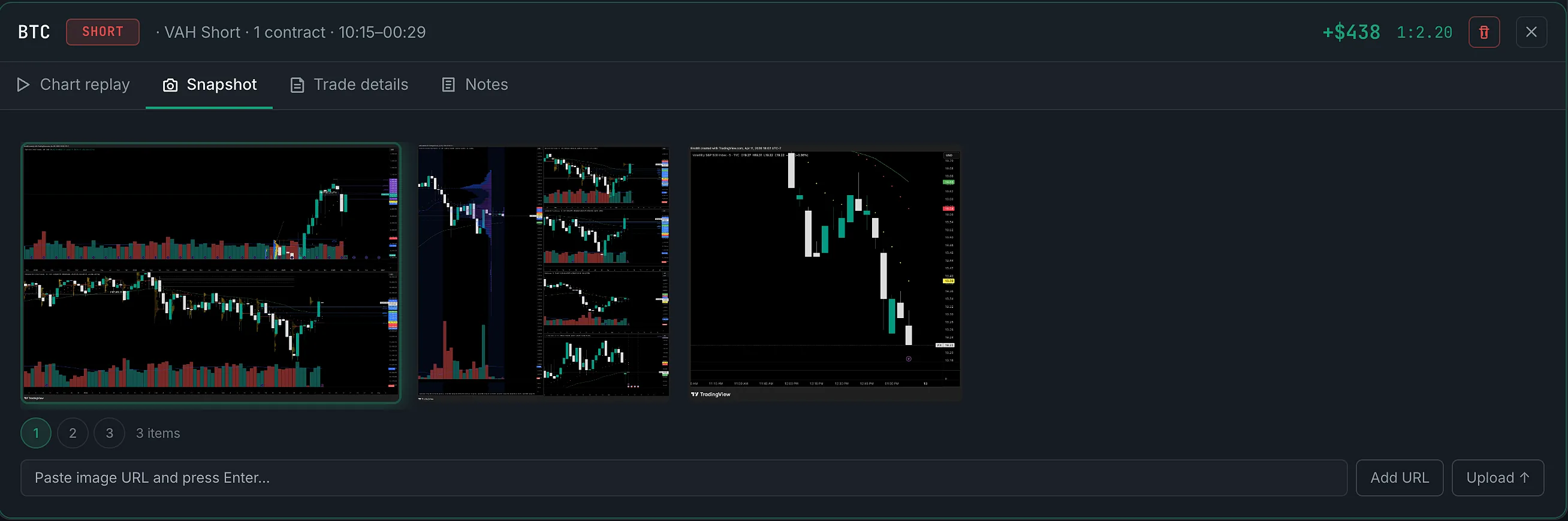
Snapshot
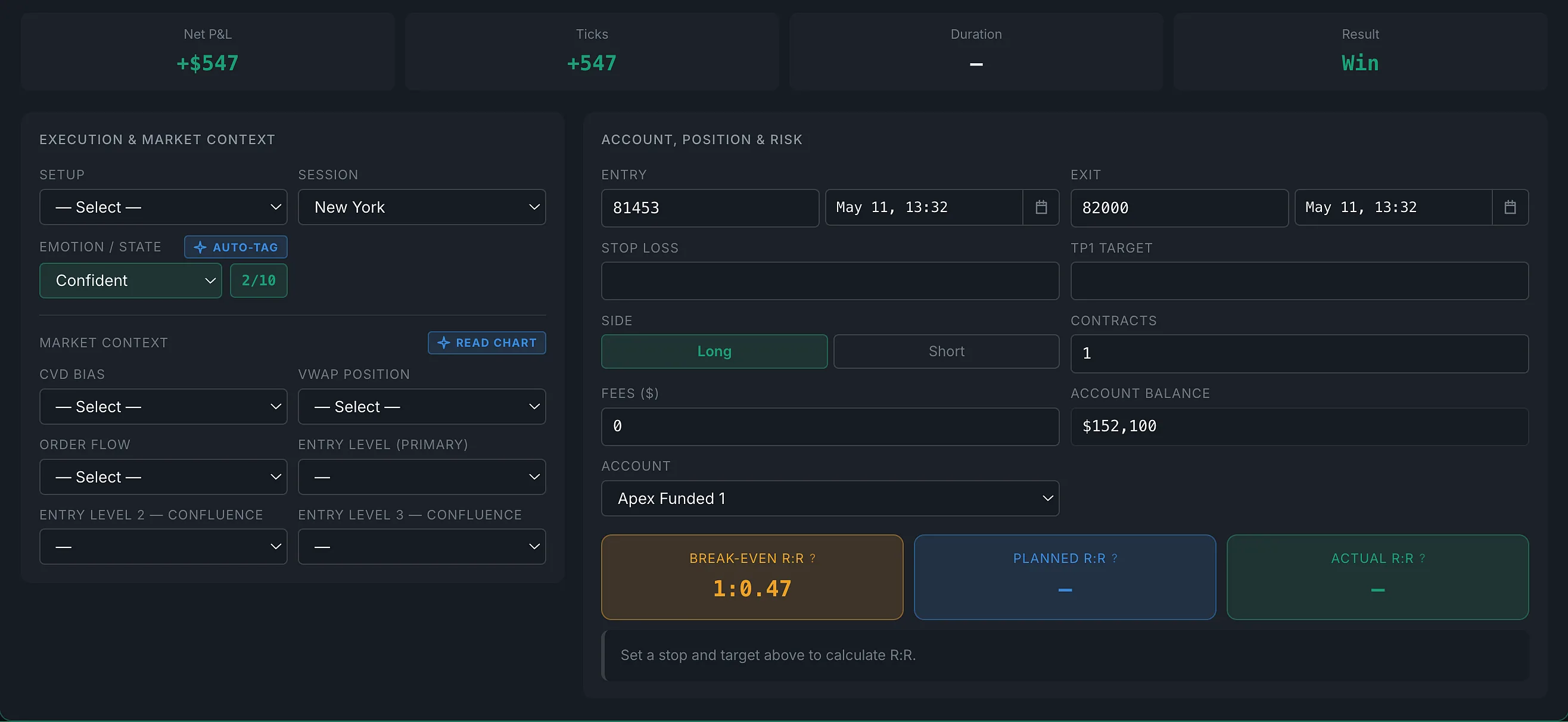
Trade Details
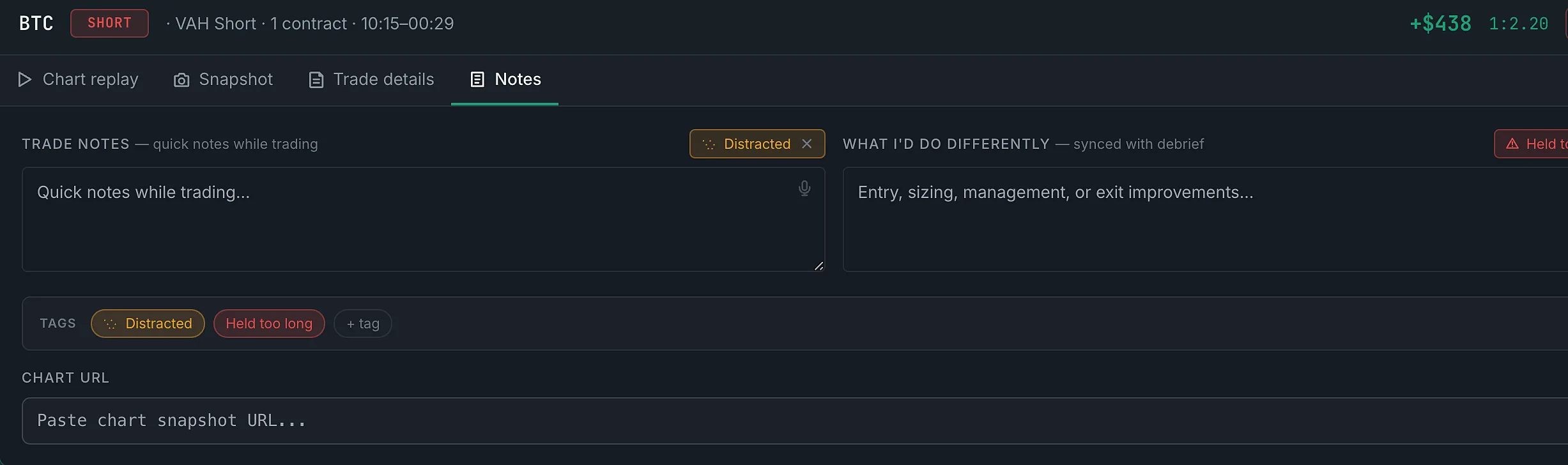
Notes

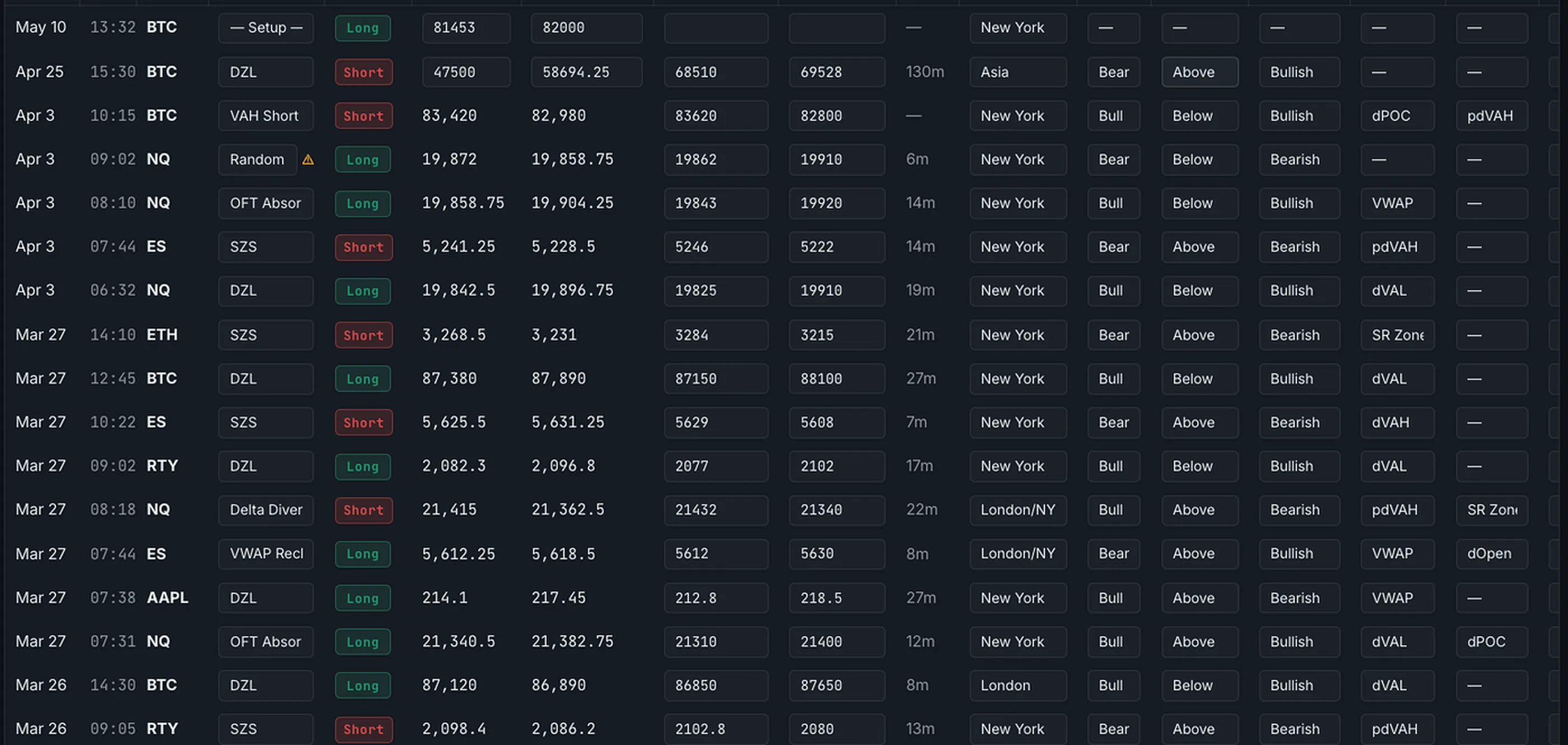
Voice-activate mid-session. Speak your trade, drop a chart screenshot, and AI fills in setup context, entry levels, and indicator readings — without breaking your focus. Then click any row to open the full detail panel.

  • Inline editing directly in the table — setup, stop, TP, entry levels, and any custom columns you've added (CVD, VWAP, order flow, and more — all configurable)
  • AI reads chart screenshots and fills context automatically — entry levels, indicator readings, key zones
  • Asset filter — switch between futures, stocks, forex, crypto; sub-row narrows to the specific instrument
  • Trade detail panel — 4 tabs: Chart Replay, Snapshot (annotatable), Trade Details, Notes
  • CSV import with automatic column mapping for all major brokers and prop firm platforms
Voice Logging AI Screenshot Read Inline Edit 4-Tab Detail Panel CSV Import
Chart Replay
Snapshot
Trade Details
Notes
TradePerformance Journal — trade logging view
Playbook

Turn your edge into a repeatable system.

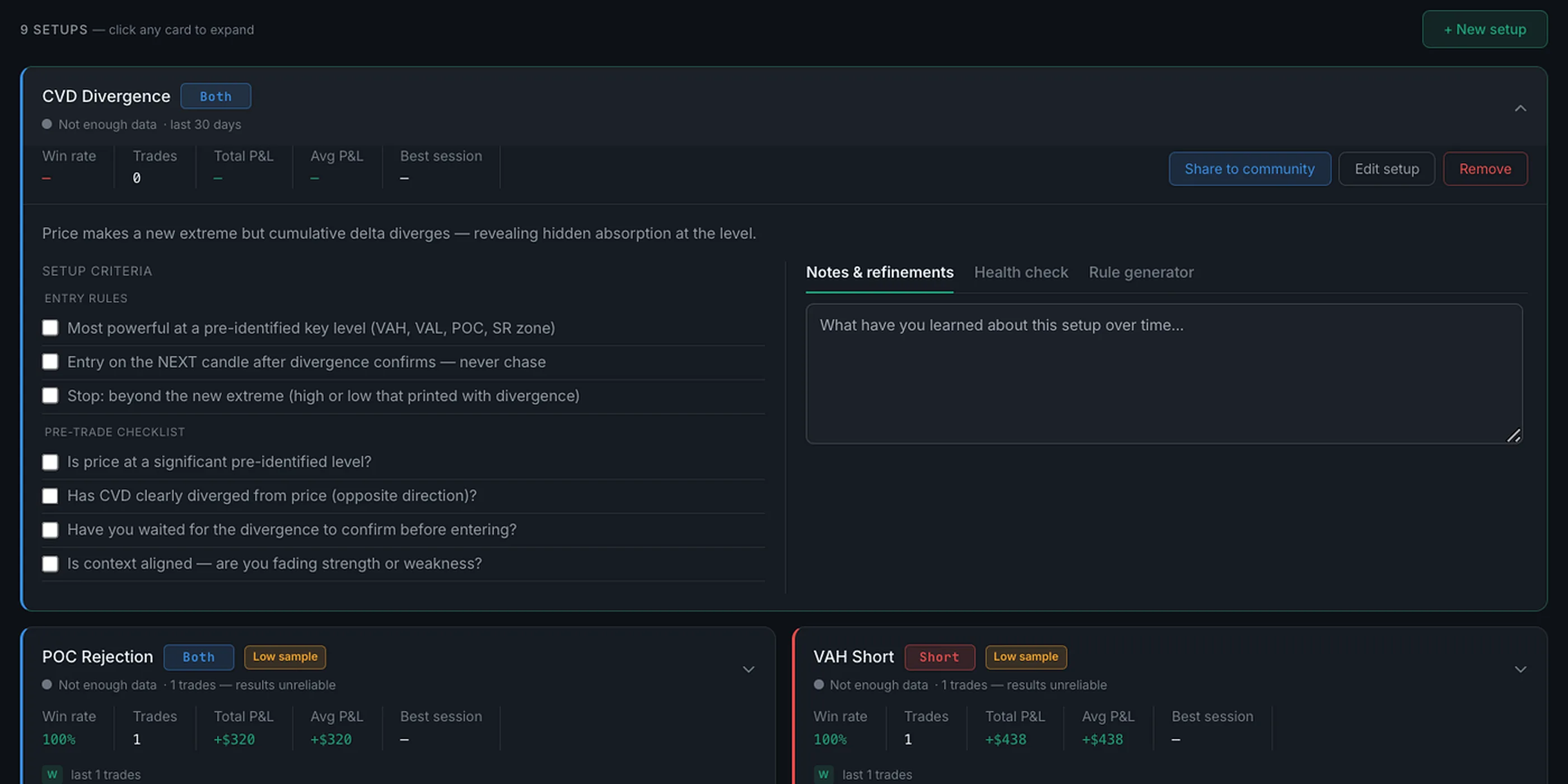
Define every setup with entry rules, a pre-trade checklist, and risk parameters. TradePerformance tracks setup health over time — so you always know which ones are working and which are costing you.

  • Setup health score, win rate, avg R:R, and streak — live
  • AI rule generator — describe your setup, get structured rules
  • AI health check — automated feedback on edge consistency
  • A library of strategy templates to start from — order flow, value area, price action, session, ICT/SMC and options
TradePerformance Playbook
Pre-Market Prep

Never trade without a plan again.

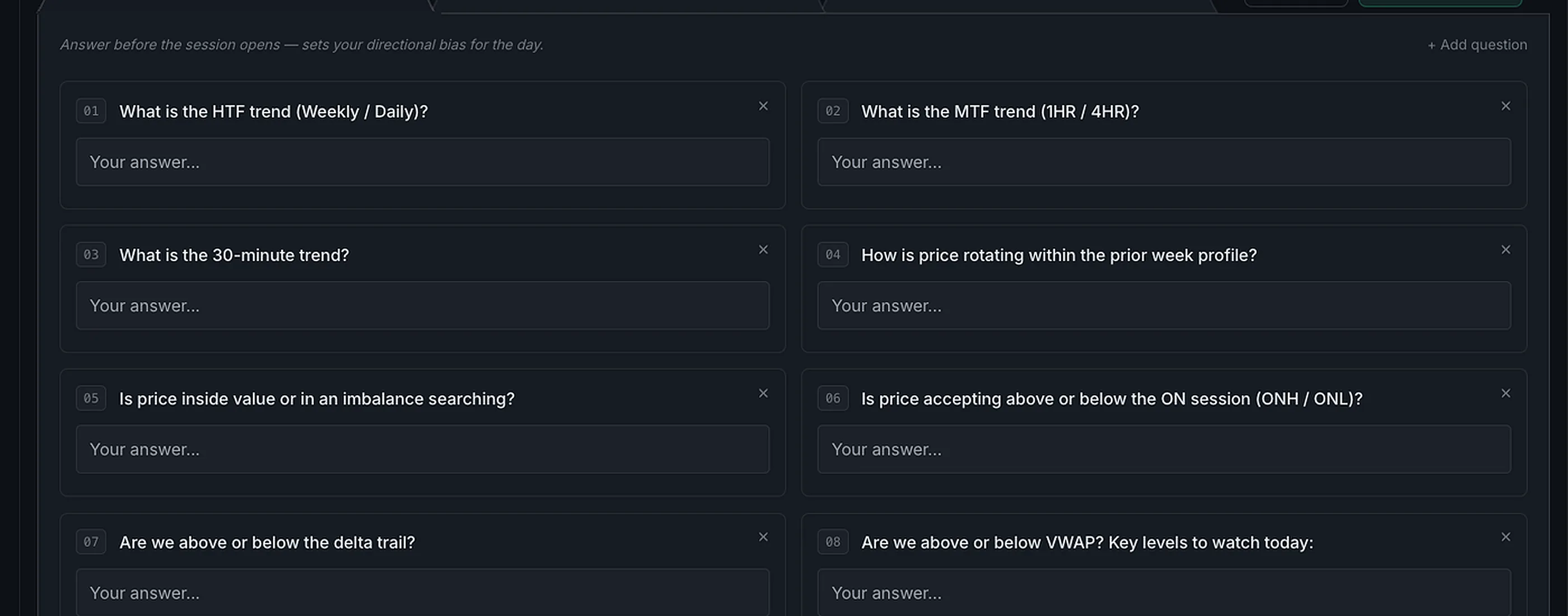
Custom templates walk you through your bias, key levels, and setup criteria before the open. New traders get a proven framework. Experienced traders get it done in two minutes.

  • Fully customizable question templates — your morning routine
  • Sets your directional bias before price moves
  • Feeds directly into your end-of-day debrief for cross-reference
  • AI can draft answers based on current market context
TradePerformance Pre-Market Prep
Daily Debrief

The habit that compounds over time.

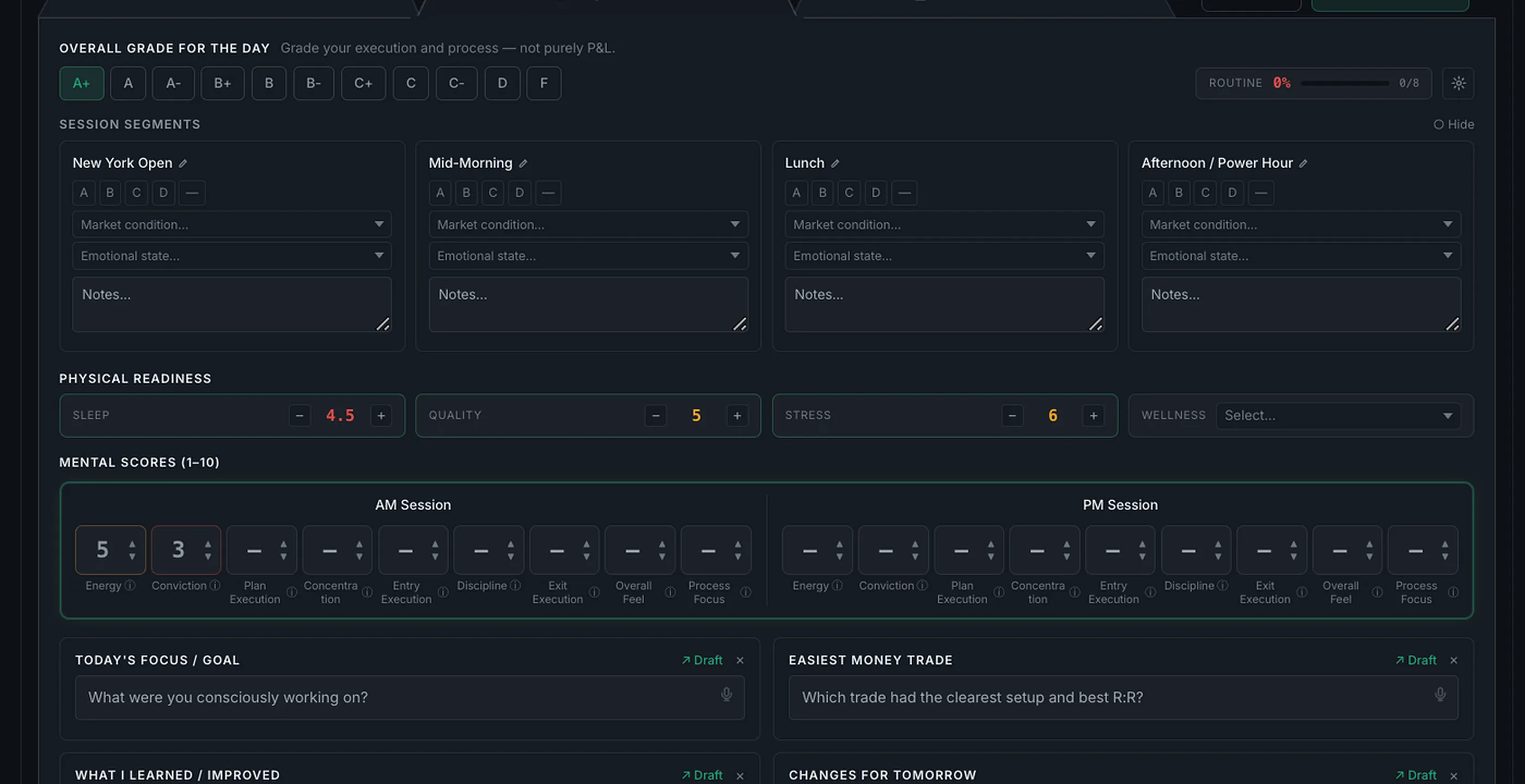
Structured end-of-day review across every dimension — session grades, mental scores, physical readiness, and per-trade notes. This is where the actual improvement happens.

  • Session grading across every part of your trading day
  • 8 mental score dimensions tracked AM and PM
  • Sleep, stress, and wellness for physical readiness
  • AI Draft — fills in notes directly from your trade data
  • Annotate screenshots directly in the debrief view
TradePerformance Daily Debrief
AI Coach

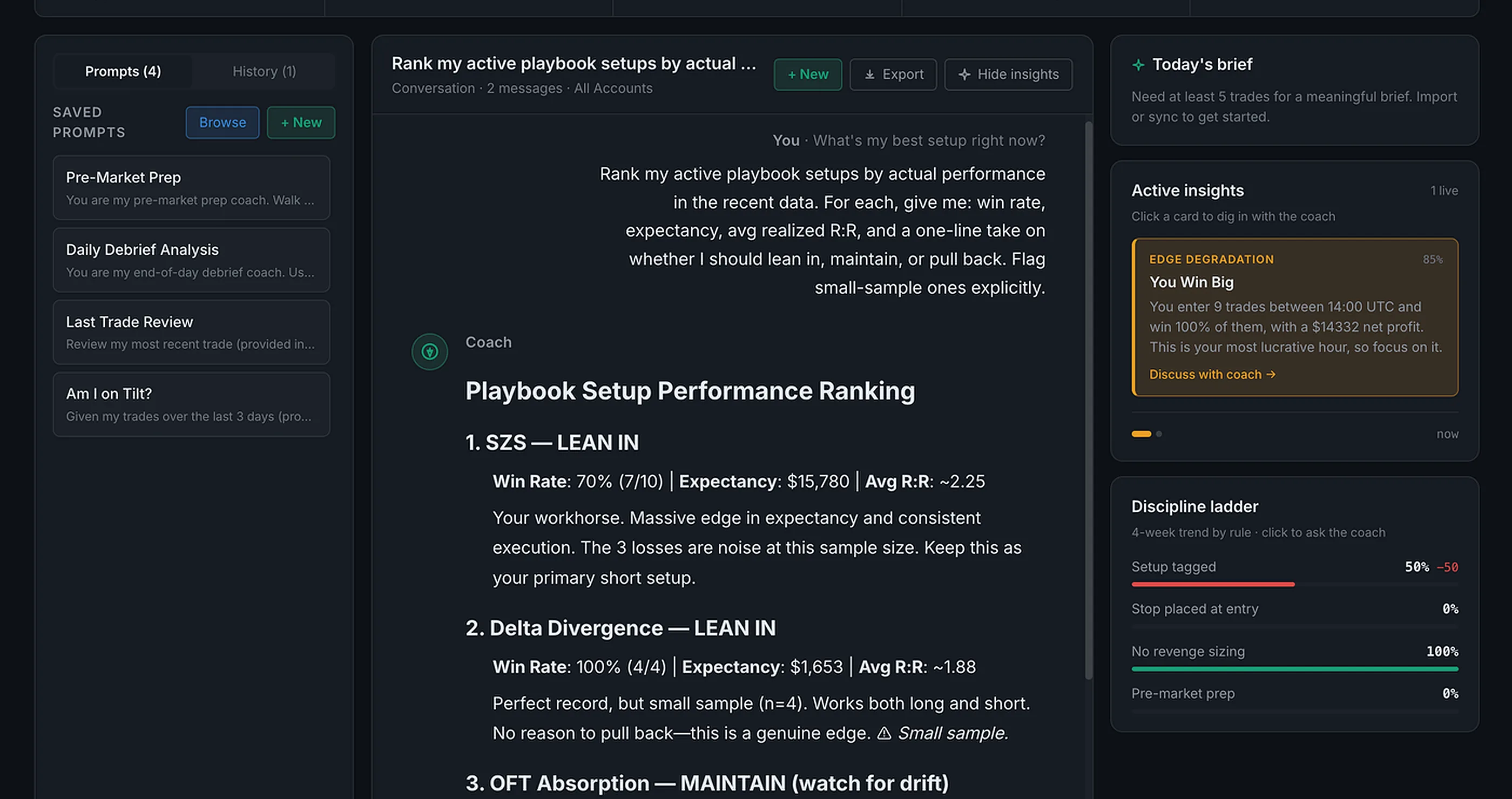
A coach that knows your numbers before you speak.

Loads your last 30 trades, active setups, most recent debrief, and mental scores before you type anything. Ask anything — it already has the full picture. Bring your own API key, including free-tier options — your conversations never pass through our servers.

  • Full context auto-loaded — trades + setups + debrief + mental scores, before you type a word
  • Saved prompt library — Pre-Market Prep, Tilt Check, Trade Review, and your own custom prompts
  • Pattern-detected alerts you can dig into mid-session with one click
  • BYOK with any provider — OpenAI, Anthropic, or free-tier models. Your key, your data, zero middleman
BYOK OpenAI Anthropic Free-tier models
TradePerformance AI Coach
Calendar + Review

See your month. Learn from every day.

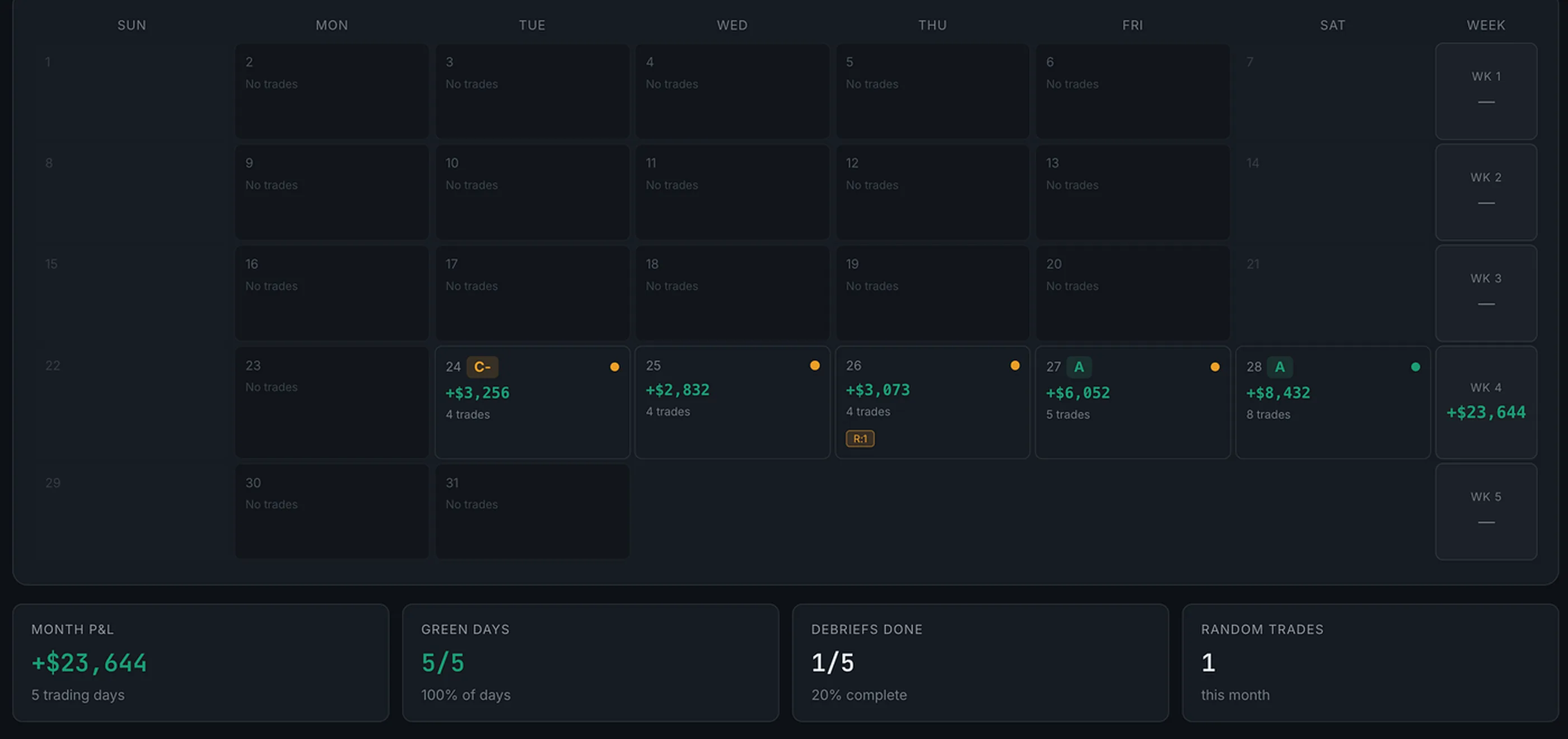
Full calendar view of your trading month — P&L, trade count, grades, and debrief status at a glance. Click any day for a full review. Watch habits build week by week.

  • Month view with P&L, trade count, and grade per day
  • Weekly totals — see your rhythm across weeks
  • Debrief status dot — stay accountable to your process
  • Random trade alerts — flags off-plan trading days
TradePerformance Calendar
News & Market Context

See how your trades react
to the news.

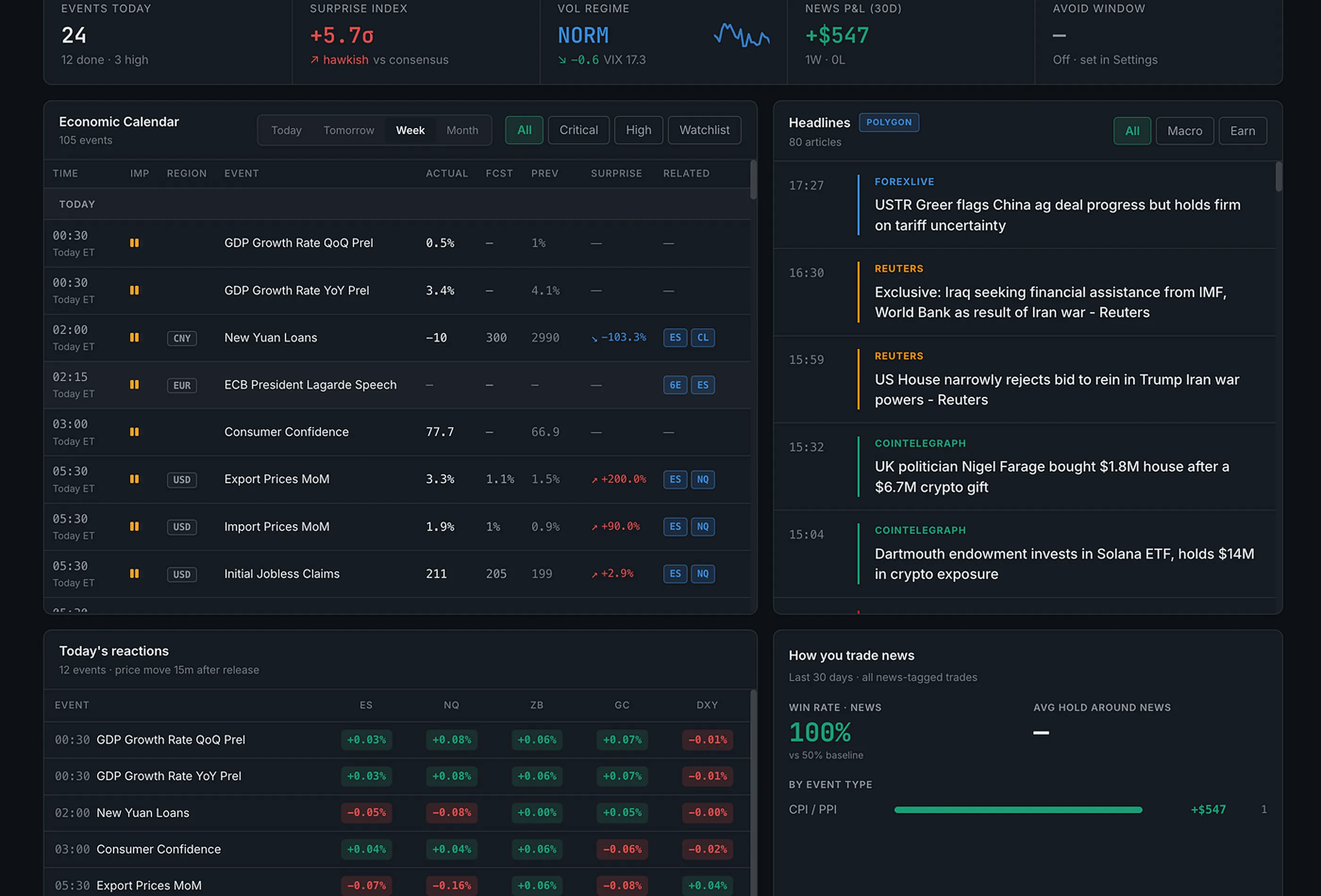
High-impact economic releases are automatically tagged on your trades. See exactly which news events coincide with your wins and losses — and whether your edge holds during volatility or collapses under it.

  • News event tags attached automatically near high-impact releases
  • News P&L chart — overlay economic events directly on your equity curve
  • Pre-market news context feeds into your morning prep and bias setting
  • Identify which event types you trade well vs. which you should sit out
Auto-tagged News P&L Event Overlay
TradePerformance News Integration
Prop Firm Traders

Built for traders who
have something to protect.

Prop firm accounts have hard rules. TradePerformance tracks every one — across every account — and fires alerts before you breach a limit you can't take back.

Risk of Ruin
RoR%

Know Your Probability of Blowup

Calculates your statistical risk of ruin based on win rate, avg win/loss, and current drawdown. See it in the Risk tab — updated with every trade.

DLL Tracker
$DLL

Daily Loss Limit — Always Visible

Your configured daily loss limit is tracked in real time on the dashboard. The circuit breaker alerts you before you hit the line — not after.

Pass Probability
PP%

Your Odds of Passing the Eval

Monte Carlo simulation across your actual trade history — how likely are you to pass, given your current edge and the eval rules? Simulates thousands of paths.

Multi-Account
∞

Unlimited Accounts, One License

Live, Funded, Evaluation, Demo, Backtest — all tracked separately. Switch accounts in one click. View per-account analytics or aggregate across all.

Who it's for

Built for traders who
take their craft seriously.

Futures traders

Order flow traders who want more than a spreadsheet

CVD, order flow context, session breakdown, and prop firm risk tools built for how you already trade. CSV import from any platform.

Prop firm traders

Managing multiple accounts across eval, funded, and personal

Separate accounts, separate analytics. Daily loss limit tracker, prop firm pass probability, and circuit breaker alerts to protect your drawdown.

Active day traders

Stocks, forex, crypto — anyone who trades at volume

Voice log through the session, debrief after close, and let 30+ charts tell you which setups are working and which ones are costing you.

Analytics

Stop guessing.
Start knowing.

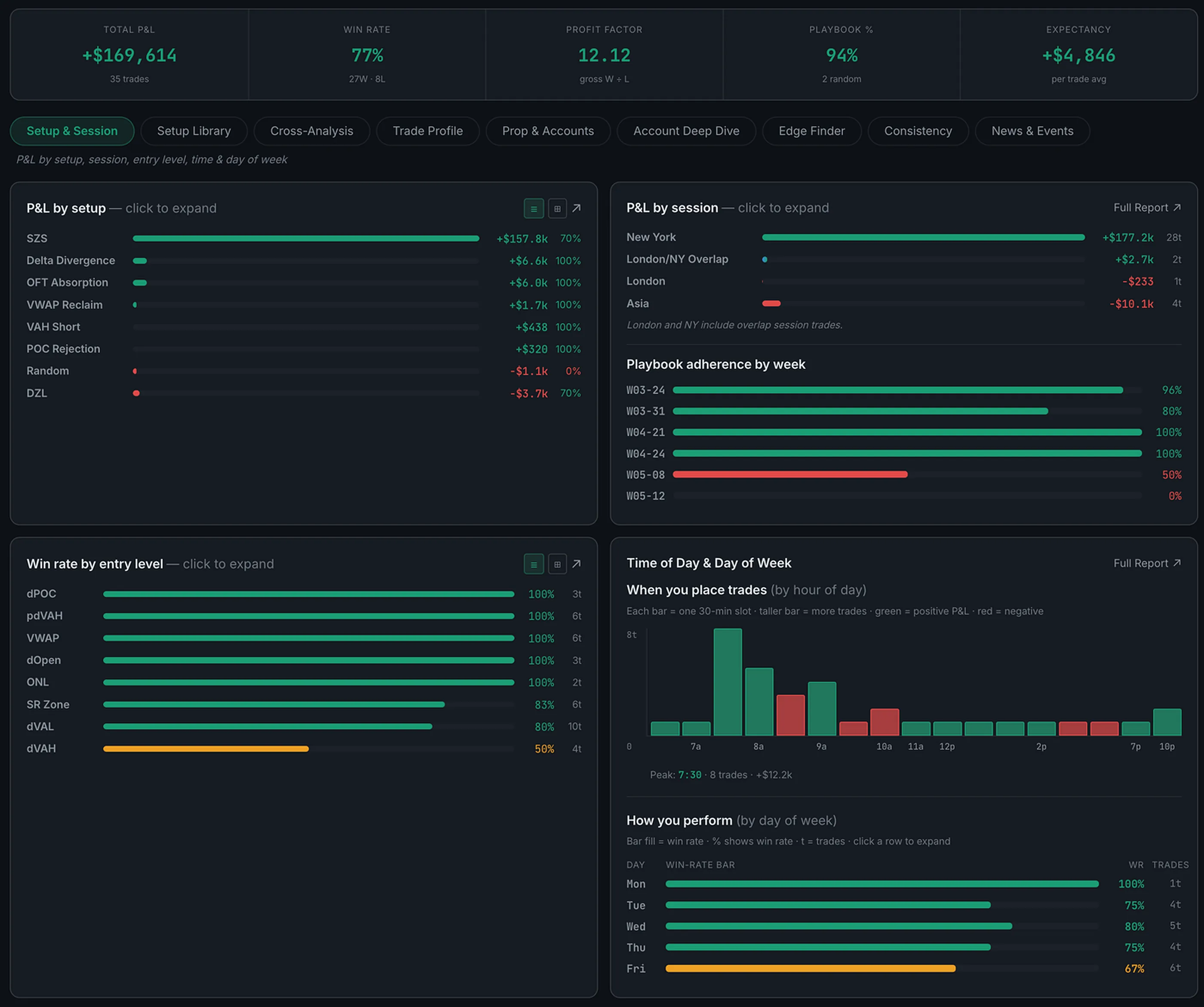
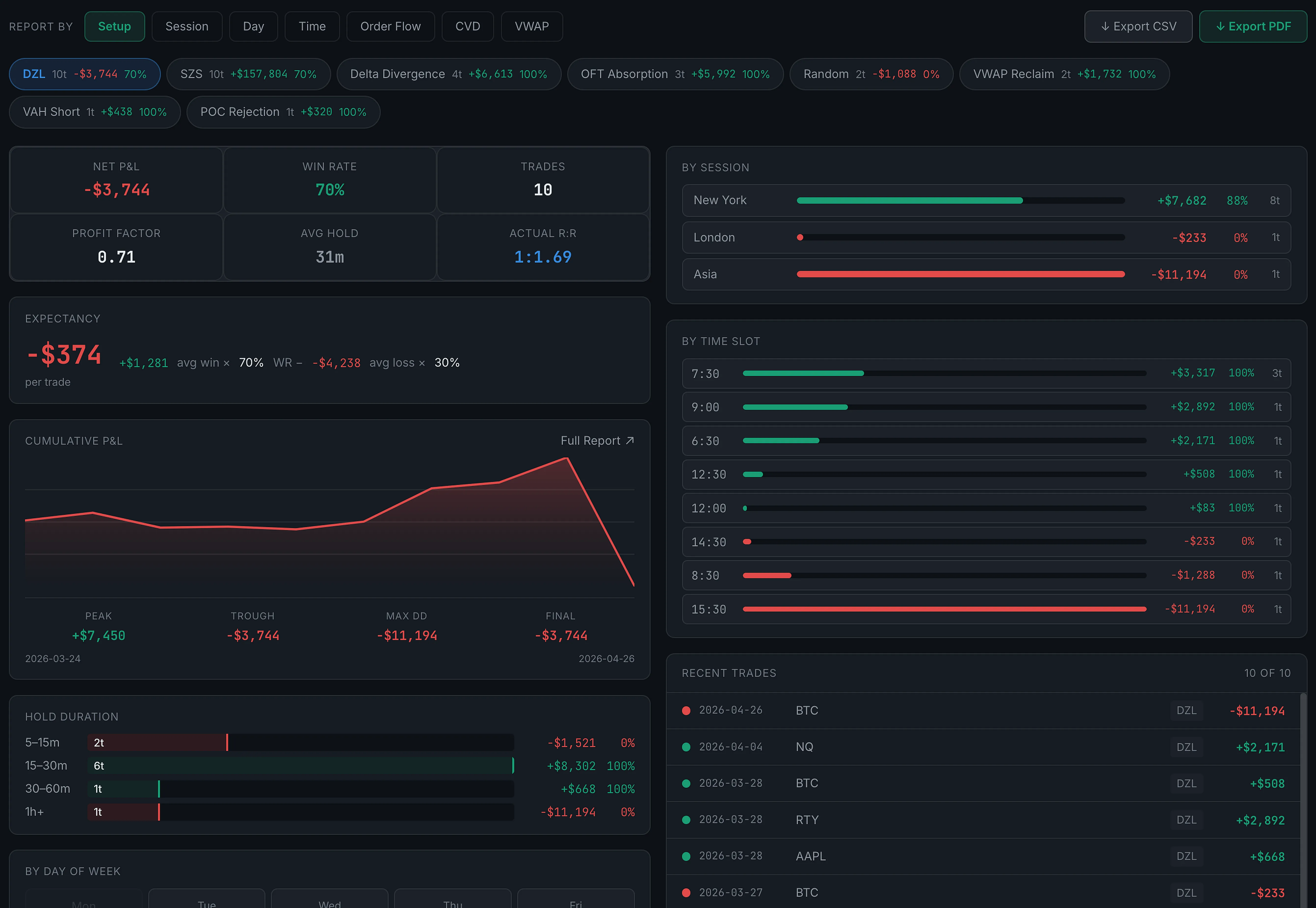
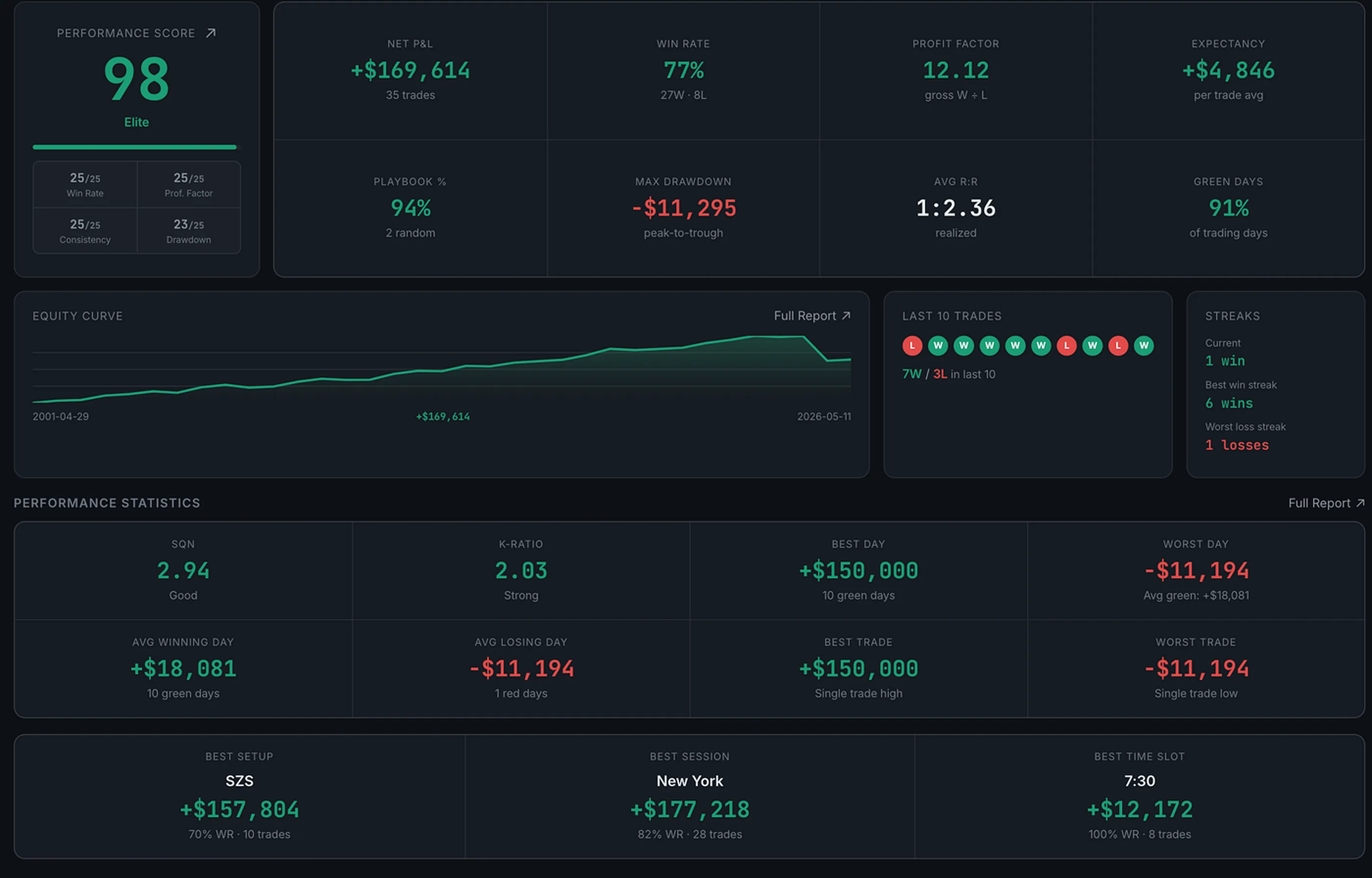
Six tabs. 30+ charts. Every angle of your performance — edge, execution, risk, psychology, and a full session report you can download and keep.

6
Analytics tabs
30+
Charts & reports
8
Psychology dims
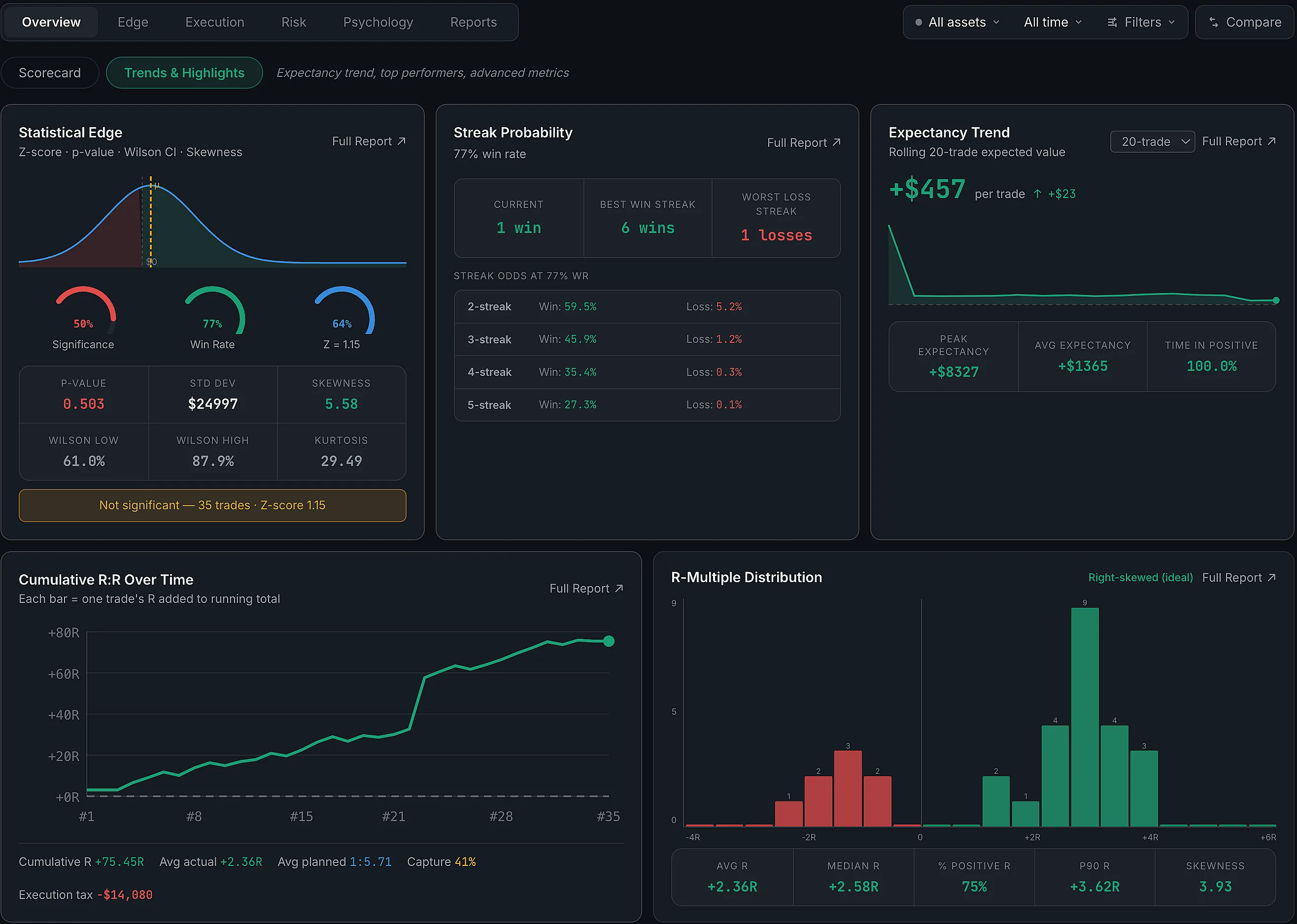
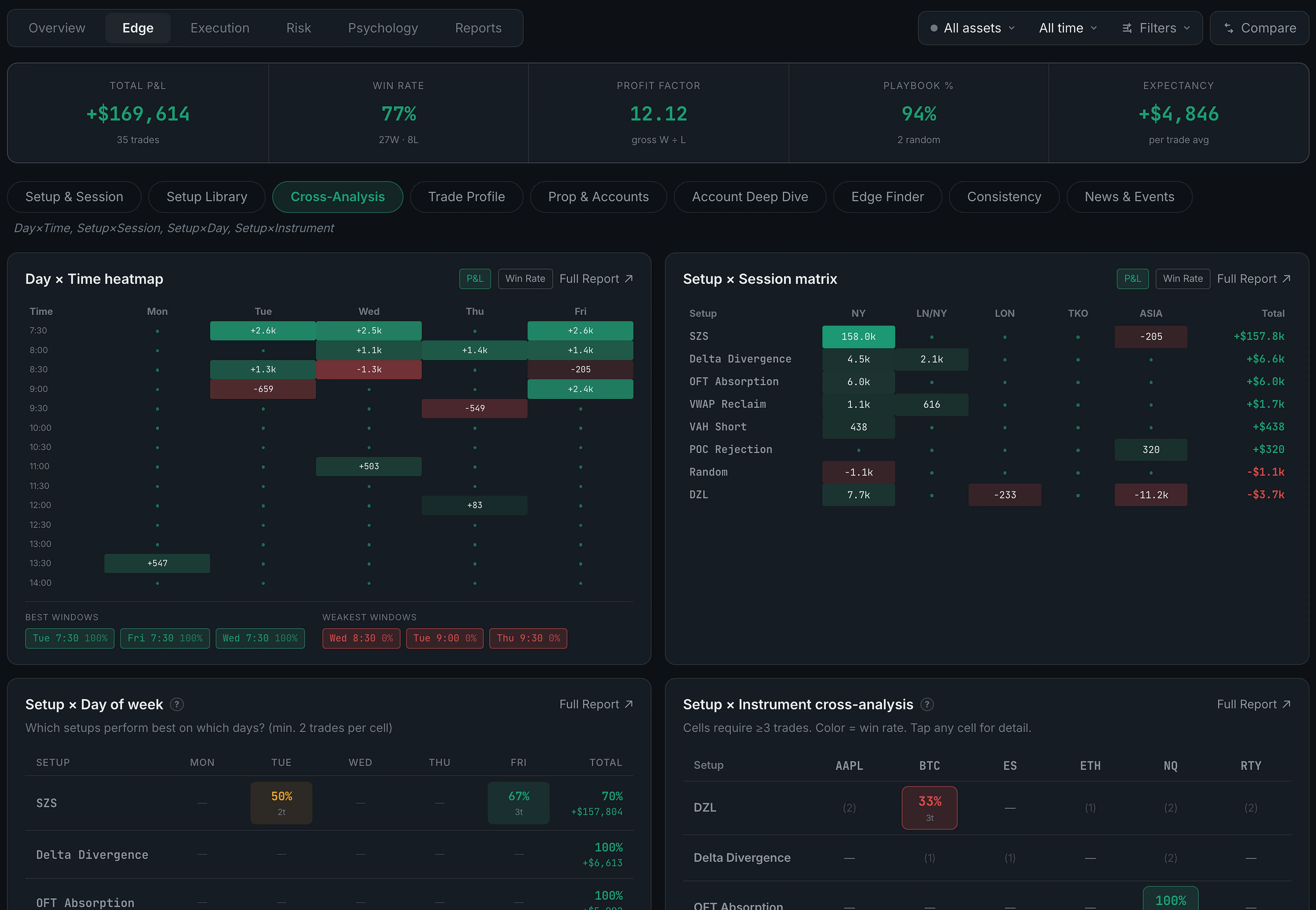
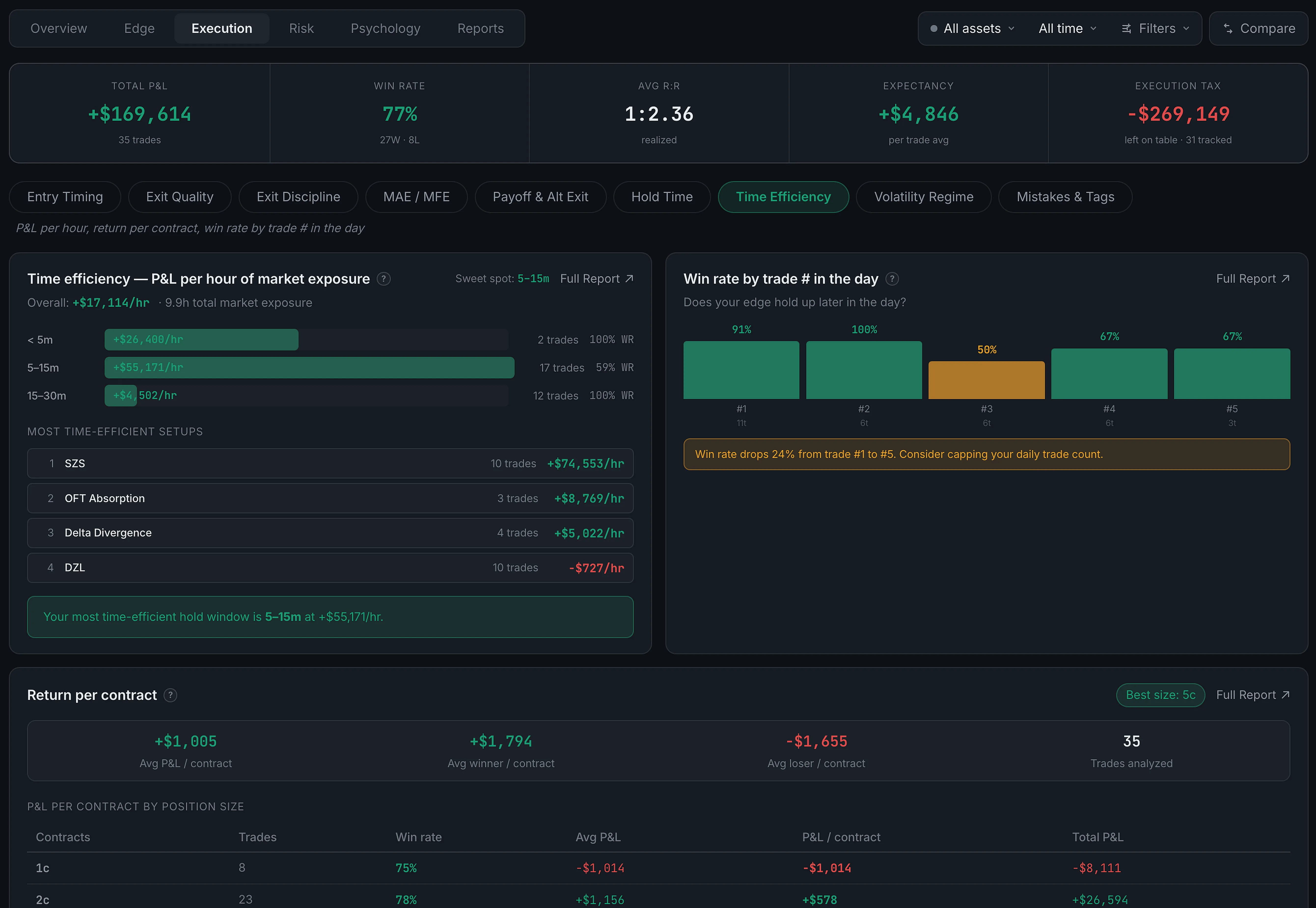
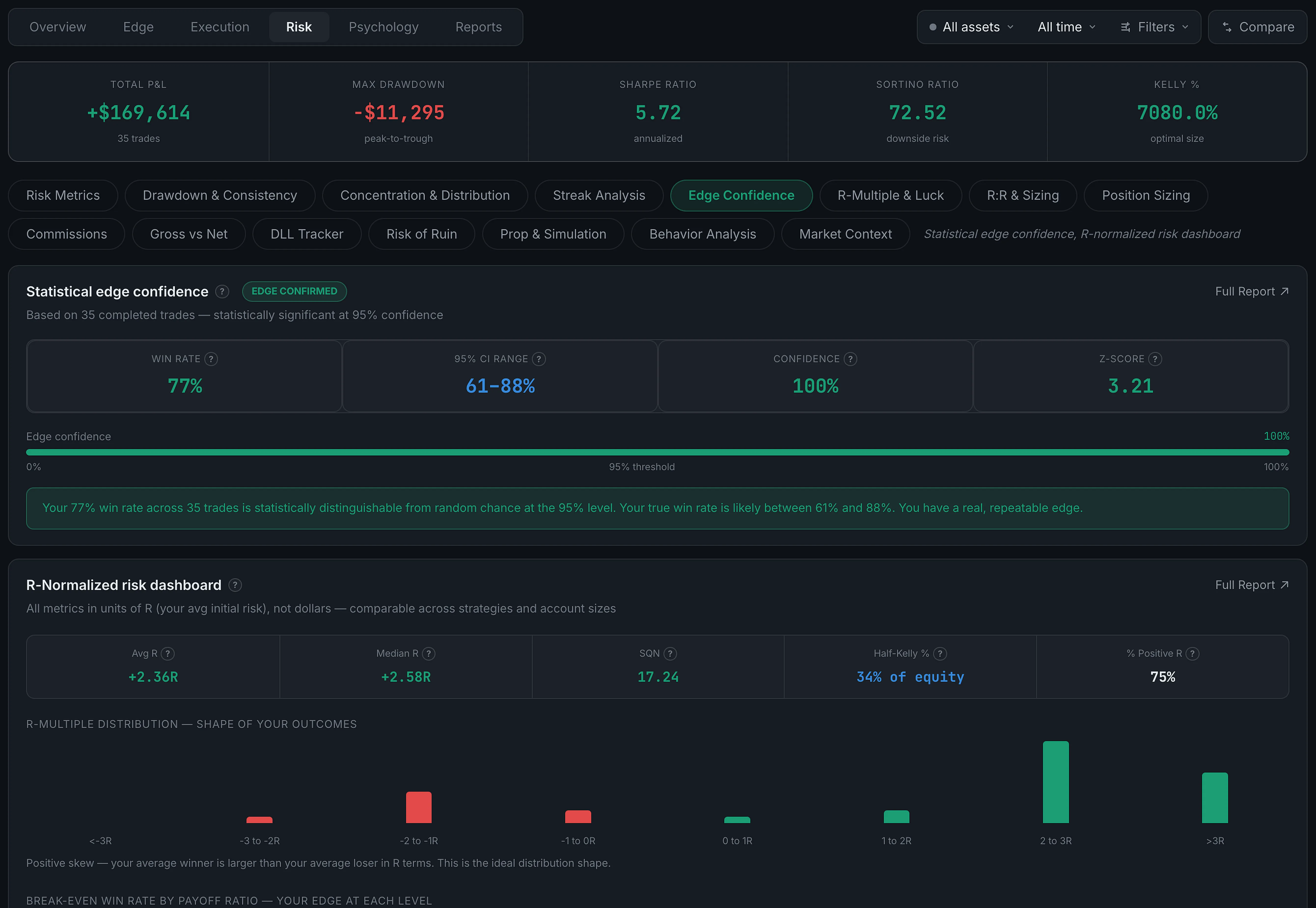
TradePerformance Analytics Edge
Analytics Overview
Analytics Edge
Analytics Execution
Analytics Risk
Analytics Psychology
Analytics Reports
01

Overview

Trader Performance Score · Equity Curve · Key Stats · Expectancy Trend · Statistical Edge · Streak Probability · Best Setup · Best Session · Win/Loss breakdown.

02

Edge

P&L by Setup · P&L by Session · P&L by Day & Time · Win Rate by Entry Level · Setup × Session heatmap · Day × Time heatmap · Adherence Trend · Long vs Short · Weekly Consistency.

03

Execution

Exit Efficiency · R-Multiple Distribution · RR Curve · EV by Setup · Entry Timing Quality · Stop Adherence · Hold Time Analysis · How much edge you leave on the table after entry.

04

Risk

Drawdown Curve · Risk of Ruin · Daily Loss Limit Tracker · Prop Firm Pass Probability · Position Sizing · Concentration · Streak Analysis · Outcome Autocorrelation · Overtrading Detector · Commission Analysis.

05

Psychology

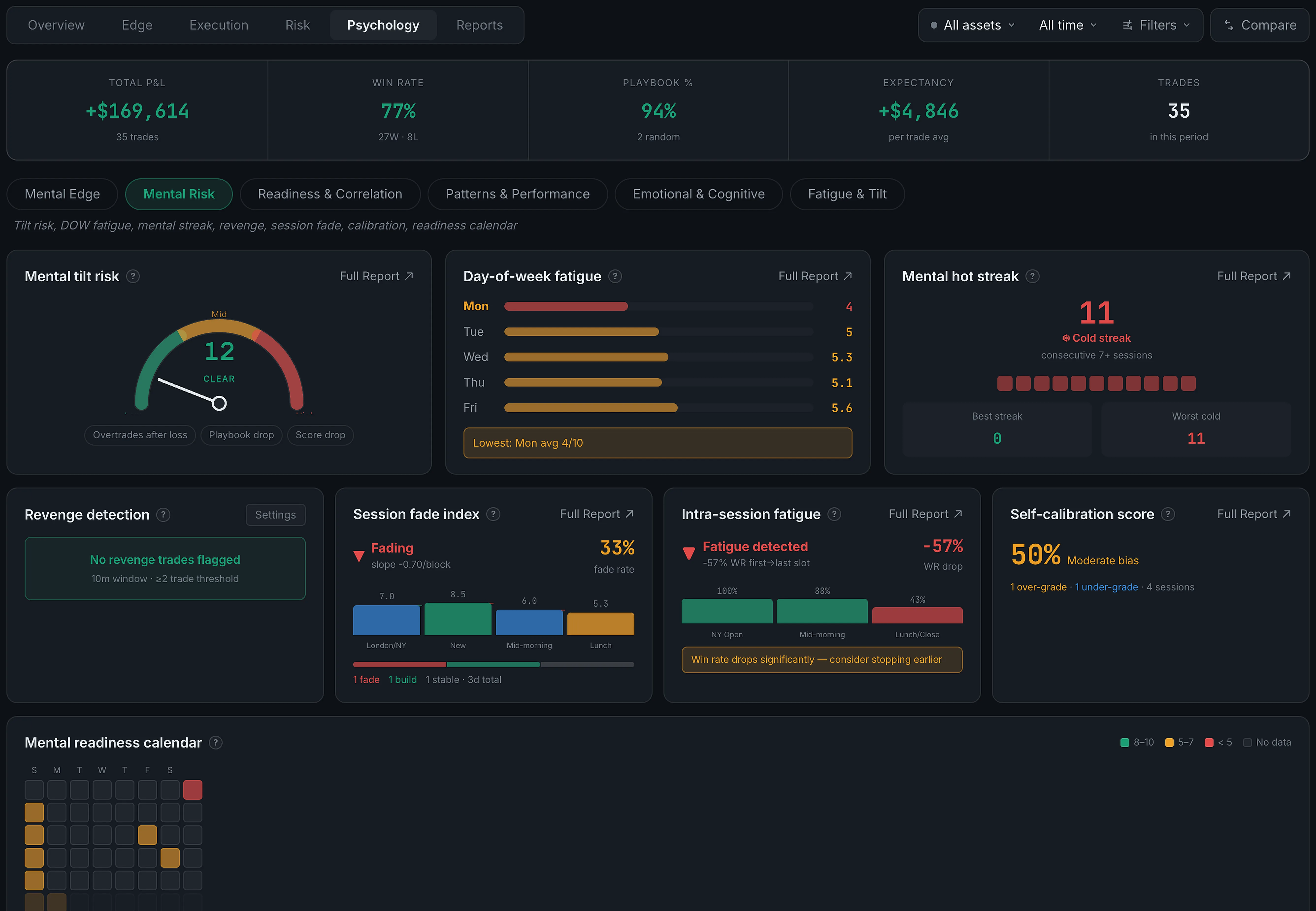
Tiltmeter · Tilt Detection · Mental Score Correlation with P&L · Fatigue Calibration · Optimal State Profile · Mental Edge Dashboard · 8 dimensions tracked AM and PM.

06

Reports

Full session summary · Key stats · Edge breakdown · Mental scores · Downloadable as PDF. Everything a prop firm, mentor, or your future self needs to see.

Tilt System

The closest thing to a
trading psychology coach
in your browser.

Tilt severity is calculated live — 1 to 10 — from your emotion tags, mental scores, debrief data, and real-time trade behavior. It's the part of the product I built everything else around.

Tilt Level 1 = Sharp  ·  10 = Stop trading
12345678910

What feeds the tilt score

Emotion Tags
Per-trade emotion tagging — frustrated, FOMO, confident, flat. Aggregated into a session emotional profile.
Mental Scores AM/PM
8 dimensions tracked before the open and after close. Score delta between AM and PM shows intra-session drift.
Behavioral Patterns
Size-up after loss, rapid re-entry, overtrading — the Pattern Alerts system feeds directly into tilt severity.
Mental Score Correlation
Which mental dimensions actually predict your P&L? The correlation chart shows you — so you focus on what matters.
Fatigue Calibration
Models how performance degrades across a session — when your edge historically drops off, and when to stop.
Optimal State Profile
Built from your best sessions — the mental conditions under which you trade your A-game. Your personal baseline.
Pattern Alerts

Six detectors watching
your behavior in real time.

Most traders don't notice a pattern until it's already cost them. TradePerformance runs six behavioral detectors in the background — firing alerts the moment your trading goes off-script.

Size-Up After Loss
Flags when position size increases after a losing trade — a classic revenge pattern.
Revenge Trading
Detects rapid re-entry after a loss — trading emotion, not setup.
Streak Tilt
Win or loss streaks that historically precede your worst sessions.
Overtrading
Trade frequency above your personal baseline — quantity over quality signal.
Drawdown Pace
Drawdown accumulating faster than your historical average — circuit breaker signal.
Off-Playbook Trades
Trades tagged "random" accumulating — your discipline score dropping in real time.
Your data. Your keys. Your call.

Most journals process your
trades on their servers.
We don't.

Bring your own OpenAI or Anthropic key — including free-tier models. Your conversations go directly to your AI provider. We never see them. Your trade data lives in your account. No one is training models on your edge.

BYOK
Your API key, your provider. Pay them directly at cost — no TradePerformance markup ever.
Zero AI middleman
AI conversations go direct to OpenAI or Anthropic. We never see your prompts or responses.
Your account, your rows
Trade data stored in your account — isolated, not pooled, not shared, never used to train anything.
vs. the competition

The features they
still don't have.

Voice logging, AI from screenshots, news P&L, and a coach that actually knows your numbers — in one license, at a founders price you lock in by joining the list.

Feature TradePerformance TradeZella Edgewonk TraderSync
PricingFounders price, set at launch$35–99/mo$197 / 16 mo$30–80/mo
Voice trade logging✓ Native———
AI logging from chart screenshots✓ Native———
AI Coach with full trade context✓ BYOK, privatePremium add-onWeekly email only$80/mo tier
News integration + news P&L✓ Built in———
Psychology / tilt tracking✓ 8 dimensionsBasic✓—
Prop firm risk tools✓ DLL, pass prob.Basic—Basic
Data ownership / BYOK AI✓ Full———

Competitor pricing and features checked 7 September 2026 against each provider’s own pricing page. TradeZella and Edgewonk were read first-hand; TraderSync blocks automated checks, so their figures come from third-party reporting. Edgewonk was running a 16-months-for-12 offer on that date. Their offerings may have changed since.

Web + Desktop, one license

Desktop app.
Included in this license.

A native desktop app for Mac and Windows that auto-captures your chart screenshots, records your session in real time, and syncs trades without any manual export. It launches alongside the web app — one license covers both, and the desktop side adds a few things only a local app can do.

⬡
Auto Screenshot Capture
Captures your chart at entry and exit — automatically, no hotkey needed.
⬡
Real-Time Data Feed
Connects directly to your platform — no CSV export, no copy-paste.
⬡
Tick Recording
Full tick-by-tick replay for post-session review — see exactly what happened at entry.
"

I got tired of logging trades into a spreadsheet and still not knowing what was actually working. So I built the journal I wanted to trade with.

Ryan  ·  Founder, TradePerformance  ·  Futures trader

Founders List

Launching soon.
Get early access.

Join the founders list to be first in the door. Everyone on the list locks in the founders price — the best price we will ever offer. Later pricing may be higher.

Founders List
Early Access
Founders price, announced when the trial opens and locked in for everyone on the list. Later pricing may be higher.
Every feature and every update included. Nothing held back behind an upgrade tier.
  • Complete system — journal, playbook, analytics, calendar, AI coach, news feed
  • Voice logging + AI chart screenshot reading — built in, no add-on
  • 6 analytics tabs, 30+ charts, downloadable PDF session reports
  • Tilt System — live 1–10 severity score, 9 psychology dimensions, behavioral pattern detection
  • Prop firm tools — DLL tracker, Monte Carlo Risk of Ruin, prop firm pass probability
  • AI Coach (BYOK) — your key, your conversations, zero middleman
  • Full debrief system — pre-market prep, 9 mental score dimensions, per-trade notes
  • Unlimited accounts — live, funded, eval, demo, backtest
  • All updates included, no extra cost
  • Desktop app for Mac & Windows — launches with the web app, both included in this license
Join the Founders List

Questions? Email us anytime.

FAQ

Common questions

Looking for how something works rather than whether to buy? The help centre walks through every part of the app.

Can I try it before buying?
+
Yes. Every account starts on a 14-day trial of the whole app — not a cut-down version, not a demo dataset. There's no free tier underneath it: the trial is the evaluation, and at the end you buy a license or you stop. The app is in final development, so until it ships every screenshot on this page is captured from the real product running on sample data. Join the founders list and you'll start your trial the day it opens, at the founders price.
I'm already paying for a journal. Is switching worth it?
+
If you're paying $30–80/mo on a competitor, that's a bill that never stops. The founders price is the lowest we will ever offer, and it is locked in for everyone on the list. You also get voice logging and AI screenshot reading most competitors don't have, plus BYOK data ownership, and CSV import brings your history across in minutes.
Does this work with my broker and trading platform?
+
Four brokers connect over OAuth — Tradovate, which covers Apex, TopStep and the other Tradovate-clearing prop firms, plus Interactive Brokers, TradeStation and Schwab. Five more connect with an API key: Alpaca, Binance Futures, Coinbase Advanced, Kraken and Bybit. TradingView posts through a webhook. On the platform side there's one autologging add-in today, for ATAS, which posts each fill the moment it happens. Everything else comes in by CSV, and that reads cleanly. The full connection list →
How does voice logging work?
+
Activate it mid-session and speak your trade — setup name, direction, what you saw. AI structures it and fills the fields. Voice runs on a Whisper key you bring yourself, Groq or OpenAI; a Groq key is free, and that's the one to get. Without a key the app says so rather than half-working. Drop in a chart screenshot and it reads the market context off the image — CVD direction, which side of VWAP you entered, order flow, any stop or target you drew, and the key levels at your entry — and leaves a field empty rather than guess at it. What voice needs →
What is actually inside a trade once it's logged?
+
Four tabs. Chart replay steps through the trade bar by bar. Snapshot holds your chart images, with drawing tools on top of them. Trade details carries the market context — CVD, VWAP, order flow, your entry levels — and the three risk boxes. Notes is where you write what happened and tag how you felt. See it in the help centre →
Does it grade my trades on whether they made money?
+
Deliberately not. The Grade column scores five things about your execution — was it a planned setup, did it have a stop, was the size within your cap, was it in your trading hours, did you honour the stop — and nothing in that calculation reads your P&L. A well-executed loser scores 100%. A badly-executed winner scores low, which is the whole point. How the grade works →
Can I track something you don't have a column for?
+
Yes — add your own column and it behaves like a built-in one. You can filter on it, it shows in the trade detail panel, and it comes through in exports. Each one is a dropdown that teaches itself: the first time you type a value it's saved as an option and offered on every trade after. Adding a custom column →
Is there anything for reviewing a whole session, not just single trades?
+
Every trading day carries a debrief. You grade the day on execution rather than P&L, mark off your routine, and score each part of the session — the open, mid-morning, lunch — separately for market condition and emotional state. Sleep, stress and nine mental scores are recorded per AM and PM session. That's what the Psychology analytics are built from. Inside the debrief →
My platform exports every fill separately. Will that import as a mess?
+
No. The importer has a Fills mode that collapses scale-ins and scale-outs back into one trade by finding where your position returns to flat, and it detects which kind of file you gave it. Fourteen platforms are recognised from their column headings alone, including NinjaTrader, Rithmic, Sierra Chart, Tradovate and the Apex and TopStep dashboards. Anything else, you map the columns yourself. The full import walkthrough →
What does BYOK mean for my data?
+
Bring Your Own Key. You connect your own OpenAI or Anthropic key and your AI conversations go straight to your provider, never through our servers. Your trade data isn't used to train anything. The key itself is stored in that browser's local storage and nowhere else — it is never uploaded, which also means it doesn't sync across your devices, so you add it once per browser. You pay your provider at standard rates, no TradePerformance markup. Where the key lives →
What does the founders price include? Any catches?
+
Every feature and every update, at no extra cost — the product is built and improved continuously, with nothing held back behind a paid upgrade tier. The founders price is set when the trial opens and locked in for everyone on the list; the exact figure is announced then, not before.
Can I run multiple accounts — prop firm, personal, evaluation?
+
Unlimited accounts — Live, Funded, Evaluation, Demo, Backtest — all in one license. Switch between them or view analytics across all simultaneously. The Risk tab tracks prop firm pass probability and daily loss limits per account.
How does the prop firm pass probability work?
+
Two tools, answering different questions. The pass probability reads your actual trajectory against your eval's rules — cumulative P&L versus the profit target, your average day, how many days breached the daily loss limit, and how close you are to the trailing drawdown — and it moves with every trade you log. The Risk of Ruin page is the simulation: two thousand paths drawn from your win rate and your average winner and loser, run against your account size, max loss and profit target, reporting how often a trader with your edge reaches the target before breaching it.
Do I get the web app, the desktop app, or both?
+
Both, under one license, on up to three devices. There's no separate desktop purchase and nothing to choose between. The Mac and Windows builds aren't downloadable yet — the download page lists them as available at launch — and when they land they add what only a local app can do: auto screenshot capture at entry and exit, a real-time data feed from your platform, and tick-by-tick recording for post-session replay. Everything else is the same on both.
Get started

Stop logging trades.
Start learning from them.

Every day you trade without a system is a day your edge stays invisible. Launching soon — join the founders list and be first in.

No spam. Launch updates and founder pricing only. Unsubscribe anytime.