How do I build a report on one setup, session, day or time?
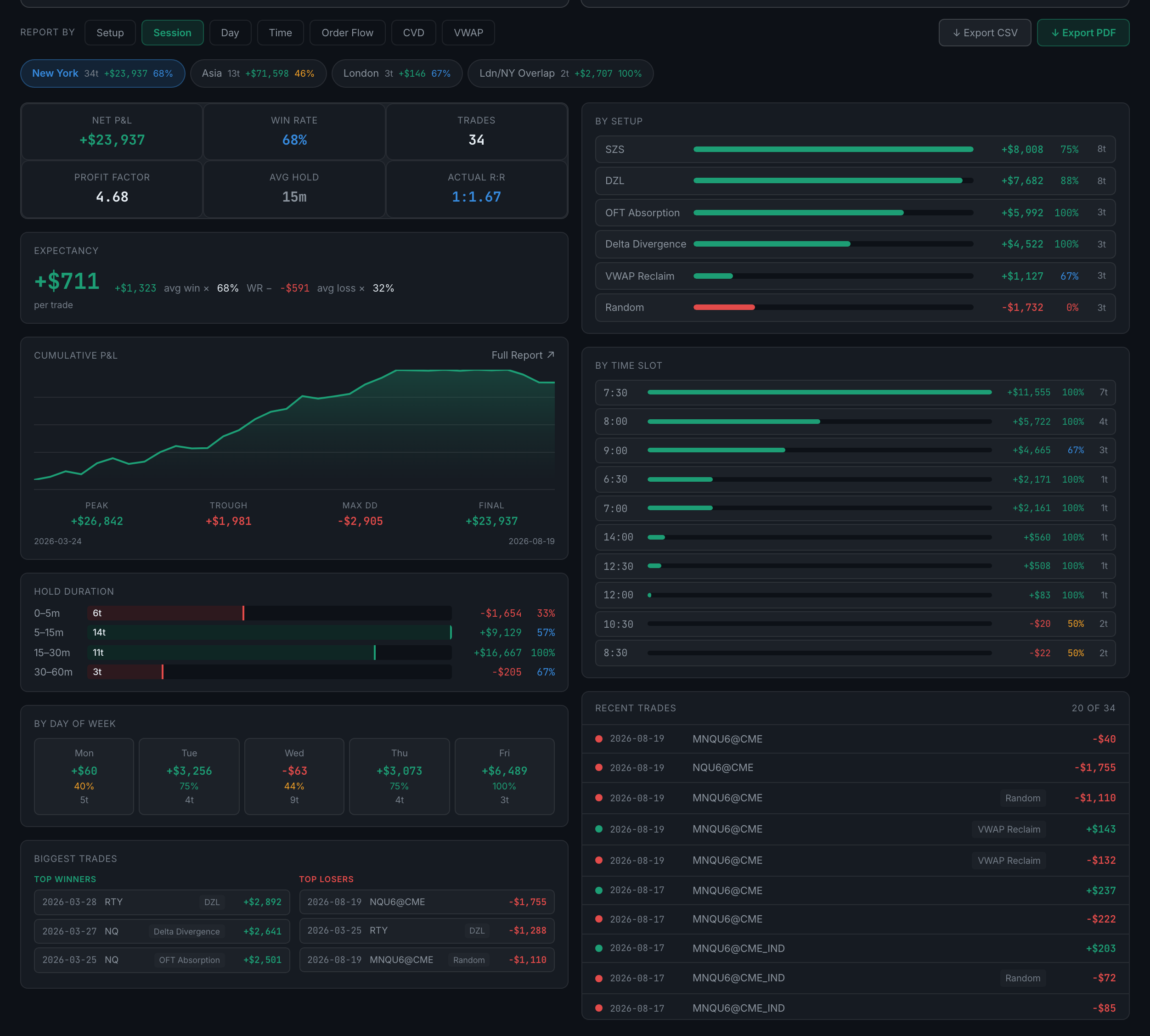
Use the Report by row at the bottom of Reports. Pick a dimension — setup, session, day, time, or any custom column of your own — pick a value, and the panel below becomes a full dossier on just those trades.
This is the most useful thing on the tab and the easiest to walk past, because it looks like another filter row.
Pick a dimension first. Four are always there — Setup, Session, Day and Time — and every custom context column you have defined is added to the row as its own dimension. On an account with Order Flow, CVD and VWAP columns, that is seven dimensions rather than four. This is the second place in Analytics where your own columns become analysis, after Edge Finder, and it is the one that gives them a full dossier.
The row underneath fills with every value in that dimension, each chip showing its trade count, P&L and win rate, so you choose from evidence rather than from memory. One is selected already, so the dossier below is never empty. Click a different chip and everything rebuilds for those trades alone.
Down the left:
- The headline rowNet P&L, win rate, trades, profit factor, average hold and actual R:R.
- Expectancy, with its arithmetic written out rather than asserted: average win × win rate minus average loss × loss rate, then the result per trade.
- Cumulative P&L for that slice, with peak, trough, max drawdown and final value, and the first and last dates under the chart.
- Hold durationDuration bands, each with trades, P&L and win rate.
- By day of weekThe same per weekday.
- Biggest tradesThe top three winners and top three losers, each with date, instrument and setup.
Down the right, three breakdowns of the same slice — by setup, by session, by day of week and by time slot, ranked, plus recent trades listing the individual trades newest first with date, instrument, setup and result.
The breakdown for the dimension you are reporting by is left out, which is the right behaviour and briefly confusing the first time. Report by Session and the right-hand column shows by setup; report by Setup and it shows by session. There is no point breaking New York down by session when every trade in the slice is already New York.
It is the closest thing the app has to "tell me everything about my DZL trades", and it works identically for a session, a weekday or a time slot.