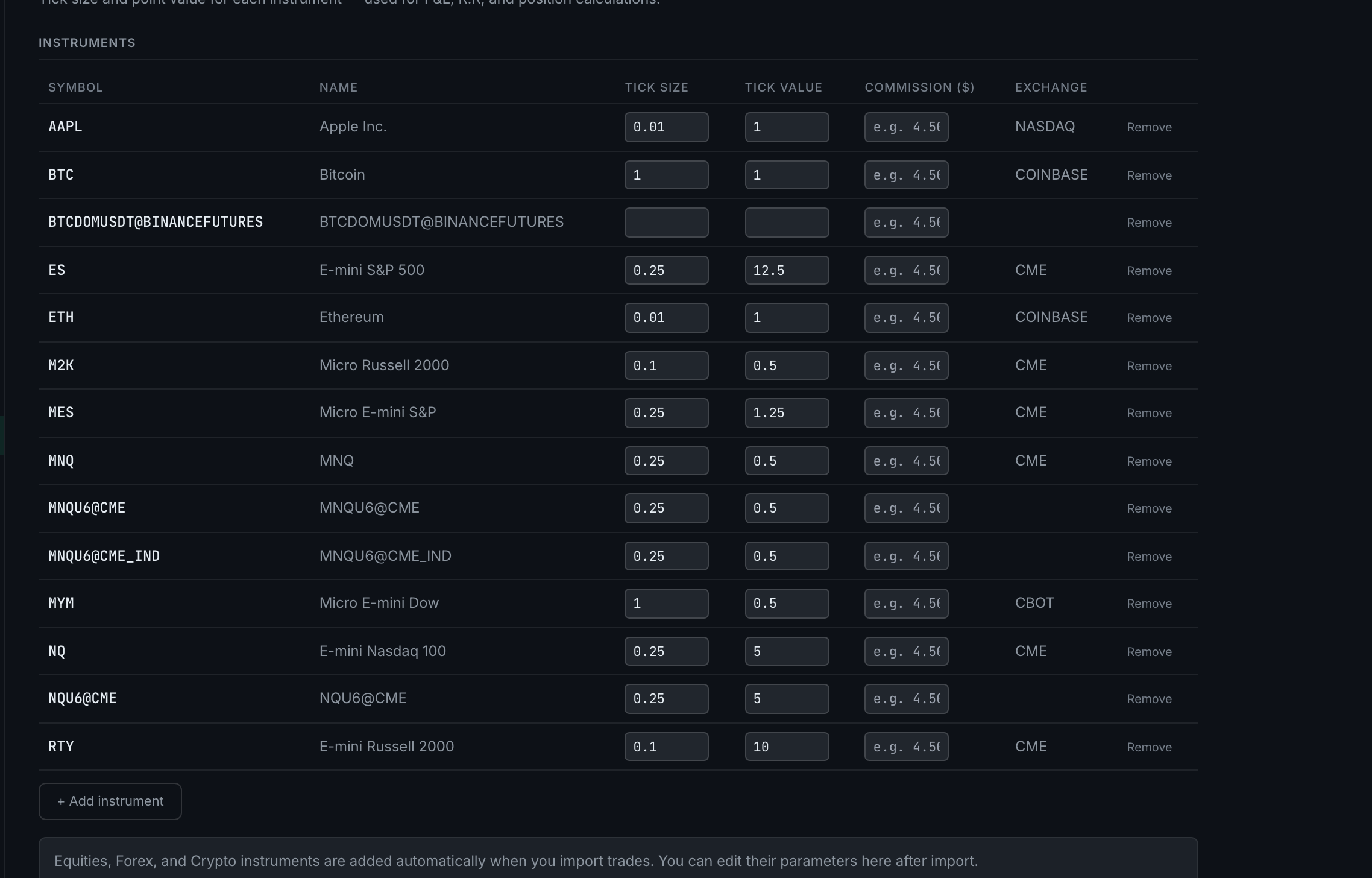
Does the asset registry fill itself in when I connect a platform or broker?
Partly, and the part it leaves out is the important one. A new instrument is added automatically the first time a trade carrying that symbol arrives — but only its name and asset class. You set the tick size and tick value yourself.
The trigger is a trade, not a connection. Import a CSV, log a fill through a connector, or type a trade in by hand with a symbol the app has not seen, and a registry entry is created for it. That happens whatever the source.
What that entry contains is the symbol, a name and a detected asset class — plus whatever tick economics the app can vouch for. It fills in both halves for the futures contracts it ships values for, the tick size alone for the handful of crypto and forex pairs whose tick value it could not source, and nothing at all for everything else — every stock included. It leaves a column empty rather than inventing it. The page says as much in its own words, under the table: Equities, Forex, and Crypto instruments are added automatically when you import trades. You can edit their parameters here after import.
Fill in the tick economics before you look for that symbol's numbers. Without both a tick size and a tick value, the app will not quote a P&L, a tick count or an R:R for it — those columns read — until you set them. That is deliberate. A dollar figure worked out from a guessed tick is not an approximation of the right answer, it is the wrong answer wearing a plausible face, and a blank tells you something a confident number does not.
A filled-in row is not necessarily a row anyone chose. An earlier version of the bundle seeder wrote tick columns for symbols it did not recognise — 0.01 and $1.00, which for a stock is a hundred times what a one-cent move on one share is worth. Those values are still in the table on accounts that used it. So read down the tick value column rather than only looking for blanks: a stock sitting at $1.00 per tick is the one to fix, and it does not look empty.
The practical habit: after your first import, open this page and fill in the tick size for anything new. It takes a minute and it is the difference between statistics you can act on and statistics you cannot.