How do I report a problem or get support?
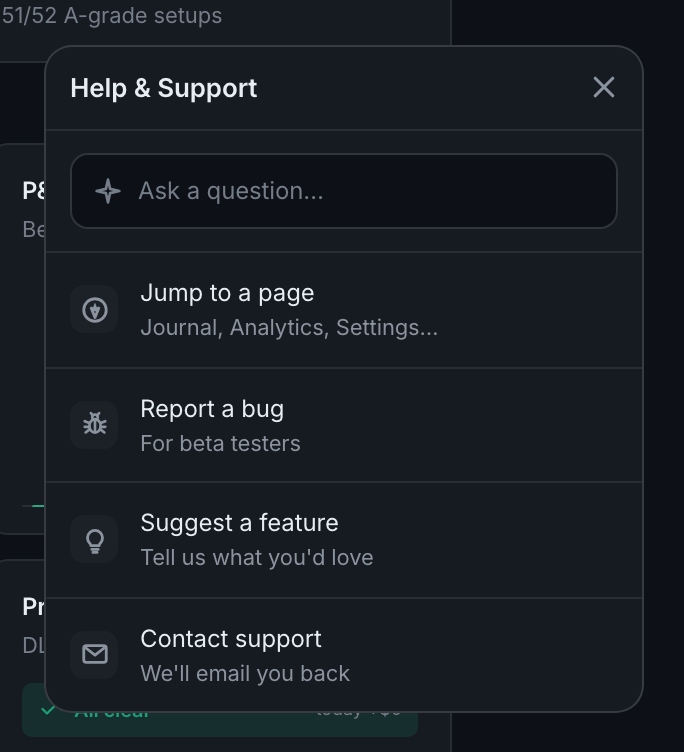
Click the round button in the bottom-right corner of any page. It opens Help & Support: an ask box and four actions. The bug report automatically attaches your current page, your browser and any recent errors, which is most of what anyone would ask you for anyway.
The panel is the right route even when you would rather send an email, because of what it collects.
Ask a question is the box at the top. It answers from the app's own knowledge base — "I can help with using TradePerformance — voice control, features, setup" — and it is instant. Note that it needs an AI key like every other AI feature; without one it will tell you so.
Jump to a page is a navigator, not a support route — Journal, Analytics, Settings and the rest — for when you know what you want and not where it lives.
Report a bug, labelled for beta testers. The form asks for steps to reproduce and expected-versus-actual, which are the two things that make a report actionable, and it attaches the diagnostic context itself. A report that says "the chart is broken" cannot be acted on; the form is shaped to stop you sending one.
Suggest a feature is its own entry — tell us what you'd love — so requests do not get filed as bugs.
Contact support — we'll email you back.
Or email. The panel offers an address, and every page of this help centre has one in its footer.
One thing worth flagging: the address shown inside the app and the address in this help centre's footer are not currently the same. If a message goes unanswered, try the other one.