How do I add a trade from the Dashboard?
Click + Trade in the panel header. A one-line quick-add strip opens inside the header — this is not the Journal's full form.
The two surfaces deliberately differ. The Journal's + Trade opens a full form with every optional field under More details. The Dashboard's opens a single strip sized for logging a trade you just took, in a few seconds, without leaving the page.
Step by step
- Scroll to Recent trades. + Trade is the middle of the three controls at the right-hand end of its header.

the + Trade button highlighted in the Recent trades header - Click it. A strip opens across the header with five fields and a Save button.
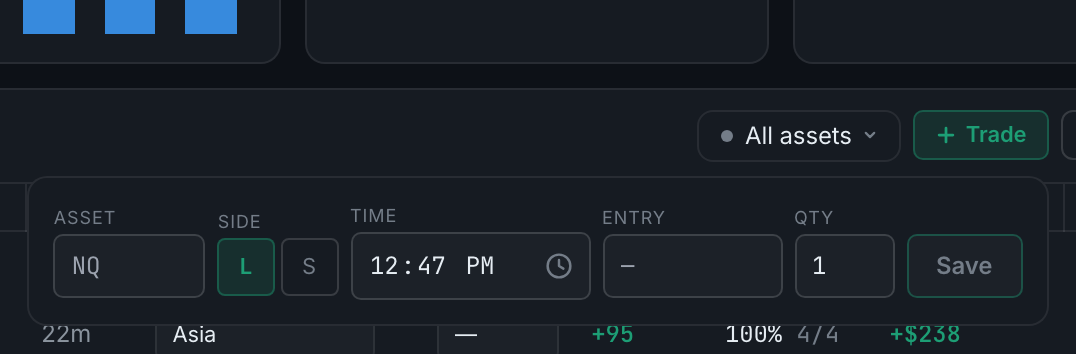
the quick-add strip open, showing asset, side, time, entry and quantity - Fill it in, left to right: type, and accepts one that is not. It starts empty — the greyed NQ is a placeholder, not a value, and Save stays disabled until you put something there
- Asset — type the symbol. It suggests instruments already in your registry as you
- Side — L for long, S for short
- Time — already set to now, so a trade you are logging as it happens needs no change
- Entry — your fill price
- Qty — contracts, defaulting to 1
- Click Save. The trade appears at the top of the list straight away.
- Everything else — stop, target, setup, market context, notes, how you felt — is added afterwards by clicking the row and using the detail panel.
If you would rather fill it all in at once, use the Journal's + Trade instead. It opens the full form.
By voice, without touching the mouse. With voice mode on, the Dashboard is a normal place to log from — the command works on whatever page you are already on, and there are two routes through it that behave differently.
- "New trade" on its own opens the same quick-add strip described above. It opens here, on the Dashboard, because the Dashboard has a + Trade control of its own — the command uses the opener on the current page. Say it from a page with no + Trade and it takes you to the Journal and opens that form instead. Log trade, add trade, record trade, enter trade, create a trade and new entry all do the same thing. - "New trade short NQ 19563, three contracts" — a phrase carrying a direction or an entry price — does not open the strip at all. It writes the trade immediately, and the row appears in Recent trades straight away. A chime plays and a toast reads back what landed. There is no review step on this route.
You can also put the command word at the end instead of the start: "short NQ 19563, three contracts, save". That route is deliberately stricter — it needs both a side and an entry price before it will fire, because without a leading command word there is nothing else to tell it apart from ordinary dictation.
One thing worth knowing before you use the fast route mid-trade: "undo" will not take back a dictated trade. Undo restores a field's previous value, and a trade logged this way was written to your journal rather than typed into a form, so there is no field to put back. Open it in the Journal and edit or delete it like any other trade. That is the reason to say "new trade" on its own whenever you are not certain — it is the route with a review step.
Voice commands, the vocabulary they accept and how to turn any of it on are covered in their own section.