How do I find and import someone else's strategy?
The User strategies tab. Expand one to read its rules, then click Import to my Playbook — you get your own editable copy.
Importing is the point of the tab. What you take is a copy: it lands in My Playbook as a normal setup, you can edit it however you like, and the author changing theirs later does not change yours. The card says as much before you commit to it — you'll get a copy in My Playbook — author edits don't change yours.
Nothing is hidden behind the import. Expanding a strategy shows its description, its entry rules and its checklist in full, so you can read exactly what you are taking first.
What is on each row:
- SearchAcross title, description, author and the rule text itself.
- Popular, Recent and FeaturedThree orderings, on the right of the count line.
- The upvoteThe triangle and a number. Click to upvote, click again to take it back. You cannot vote on your own.
- The import countThe downward arrow and a number, showing how many people have taken a copy.
- YOURSOn anything you published. Imported appears on anything you have already taken, and the button then reads Imported · Import again? so a second copy is a deliberate act rather than an accident.
The star is not a save control — it marks something Featured, and only an administrator sees it. There is no separate bookmark: importing is saving, because the copy lands in your own playbook.
Step by step
- Open Playbook and click the User strategies tab.

the User strategies tab, with its search box and the Popular / Recent / Featured orderings - Search, or switch the ordering. Popular sorts by upvotes, Recent by when it was published, and Featured narrows to the ones that have been picked out.
- Click a strategy to expand it and read its description, entry rules and checklist.
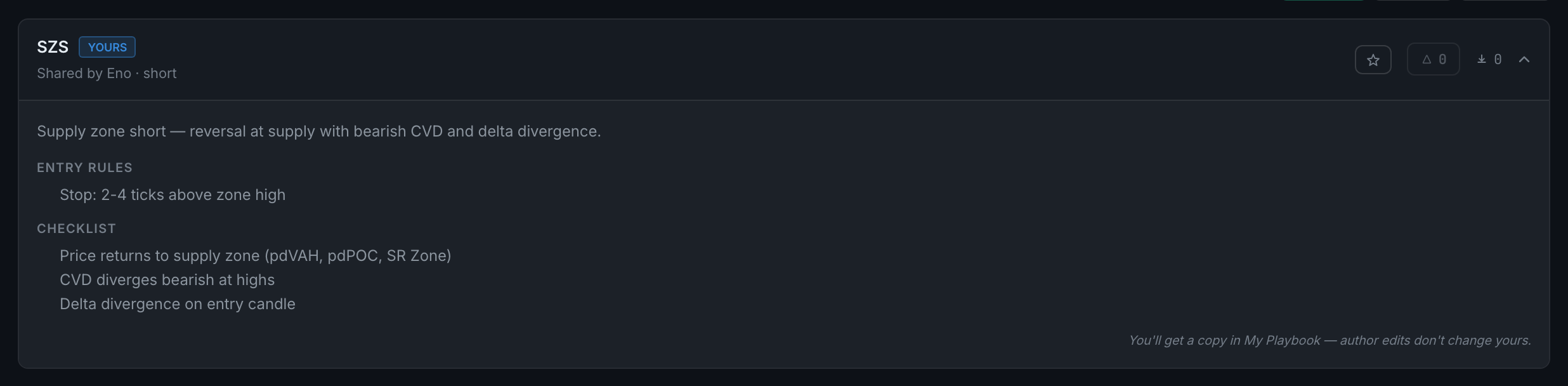
a strategy expanded, showing its rules and checklist before you take it - Click Import to my Playbook. The copy appears on My Playbook straight away.
- Expand it there and click Edit setup to make it yours — most strategies are worth narrowing to the instrument and session you actually trade.
- If something should not be on the tab, expand it and click Report.
If the tab is empty it says so, and points you at sharing one of your own instead.